
Participant
March 24, 2023
Answered

Bug in latest Adobe Reader version (2023.001.20064). Playing video files not possible anymore?

  • March 24, 2023
  • 1 reply
  • 2053 views

As I updated to the latest version of Adobe Reader, I could no longer play videos (.mp4 container format, h. 264 codec) in my pdf files.
In previous versions of the Adobe Reader I had no problem playing the video in exactly the same pdf file. Now with version 2023.001.20064 it doesn't work anymore.
Is this a bug or is the playback of videos in pdfs simply not supported anymore?


I would appreciate your experience on the topic with the new version. Christian
This topic has been closed for replies.
Correct answer AkanchhaS8194121

Hi @Christian29052527 


Thank you for reporting this to us.

As confirmed that you have started experiencing this issue with the latest version only. So, we'd like you to perform a couple of troubleshooting steps to see if that helps you get all the functions back:

1- Navigate to Reader>Edit>Preferences>Security (Enhanced)>disable "Protected Mode at Startup" and "Enhanced Security">OK>Reboot Reader

Note: these changes are only for testing purposes. Once tested, please change it back to the previous setting.

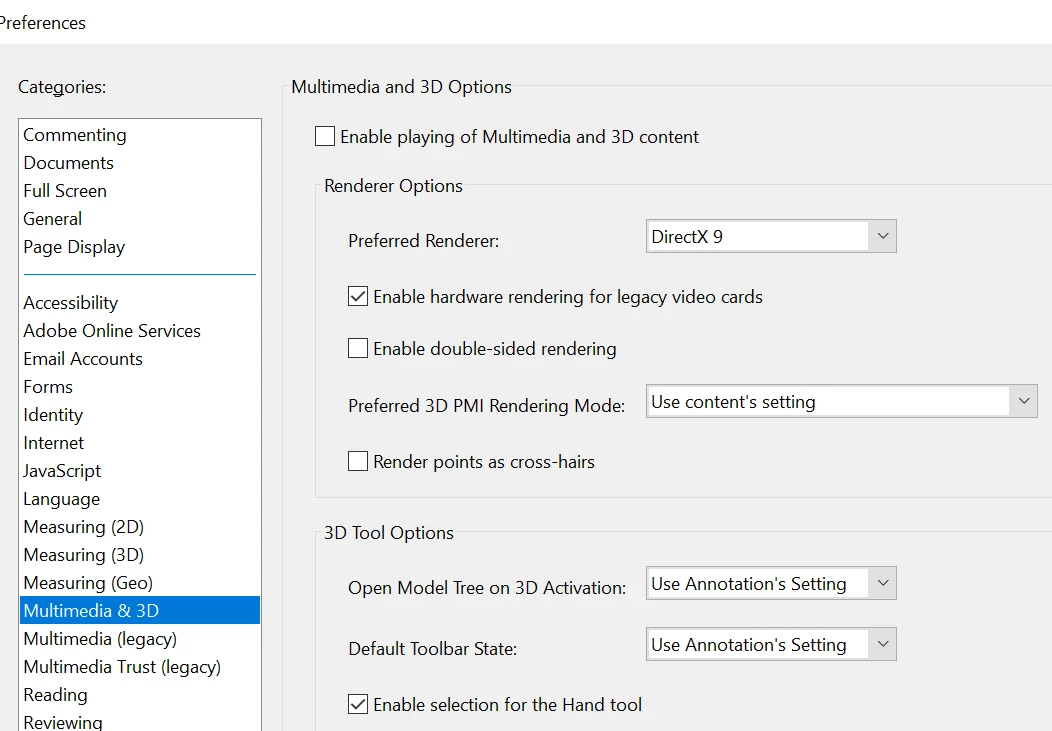
2- Navigate to Edit>Preferences> Multimedia & 3D> select the below option> OK


Thanks,

Akanchha

1 reply

AkanchhaS8194121
AkanchhaS8194121Correct answer
Legend
March 24, 2023

Hi @Christian29052527 


Thank you for reporting this to us.

As confirmed that you have started experiencing this issue with the latest version only. So, we'd like you to perform a couple of troubleshooting steps to see if that helps you get all the functions back:

1- Navigate to Reader>Edit>Preferences>Security (Enhanced)>disable "Protected Mode at Startup" and "Enhanced Security">OK>Reboot Reader

Note: these changes are only for testing purposes. Once tested, please change it back to the previous setting.

2- Navigate to Edit>Preferences> Multimedia & 3D> select the below option> OK


Thanks,

Akanchha

Participant
March 27, 2023

Great! That worked fine for me. Thank you for the fast support!!!

Meenakshi Negi
Community Manager
Community Manager
March 27, 2023

Hi Christian29052527zxph,


Thank you for confirming that the issue was resolved with the steps suggested.

Just to be sure, please try creating a new PDF with a video in it and check if it works fine.

Ensure you have switched the "Protected Mode at Startup" settings back to enabled when testing.

Would you mind sharing the PDF with us that was not working before? We would like to get this checked.


Let us know if you need any help.


Thanks,

Meenakshi