Copy link to clipboard
Copied
When I click on a PDF in an email it shows the file in Chrome. When I click on the print icon, instead of opening another window with a preview and printing options it opens a window to save the PDF to my computer. It didn't do this until a couple months ago. How do I fix this?
Hi VanceN,
If I understand correctly, when you open the PDF file in your email it opens up and after that to print this file you give the "Print" command.
When you give the "Print" command, and another tab opens up in chrome itself (With the help of Acrobat Extension) and asking to save the document.
I assume this is happening because you do not have the right "Printer" selected in the destination. Exactly same as shown in the picture below-
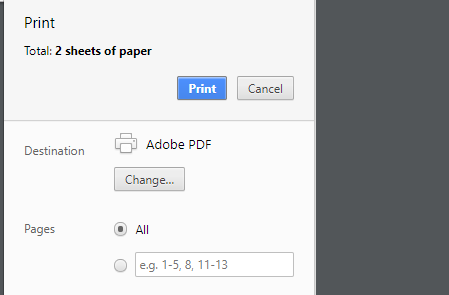
If this would be "Adobe PDF" printer, then of course it w
...Copy link to clipboard
Copied
Hi VanceN,
If I understand correctly, when you open the PDF file in your email it opens up and after that to print this file you give the "Print" command.
When you give the "Print" command, and another tab opens up in chrome itself (With the help of Acrobat Extension) and asking to save the document.
I assume this is happening because you do not have the right "Printer" selected in the destination. Exactly same as shown in the picture below-

If this would be "Adobe PDF" printer, then of course it would be giving the option to "Save" the document not the "Print"
Change the printer from Adobe PDF printer to your local printer and it would start functioning.
Let us know if it still doesn't work.
Regards,
Akanchha

Get ready! An upgraded Adobe Community experience is coming in January.
Learn more

