
Participant
January 11, 2011
Answered

Cannot adjust margins in Acrobat Reader X

  • January 11, 2011
  • 3 replies
  • 68918 views

Hi,

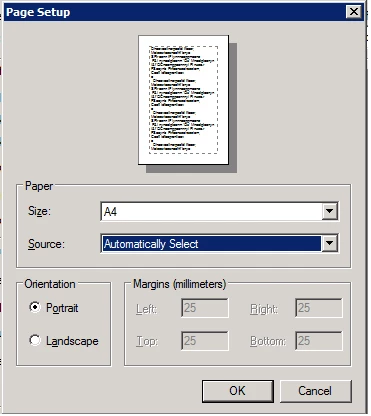
I cannot adjust margins in Acrobat Reader X. Margins are greyed out. I cannot find where to change this. Everytime we print a document it is shrinked because of the margins. A workaround for the moment is to print the documents as pictures. Is there any way to reset margins to 0?
    This topic has been closed for replies.
    Correct answer Dave Merchant

    Thise fields don't work in Acrobat X and Adobe Reader X (it's a bug). Instead, change the page scaling to "none" so your page prints at true size, irrespective of the margin values - assuming of course it's designed for the same size of paper you're printing on. You'll still be limited by the hardware margins of your printer though.

    3 replies

    zopfan
    Known Participant
    March 7, 2014

    I successfully adjusted the page margins after I had imported/typed 2 pages of text into a new acrobat file by clicking onto an icon (on the far right corner (perhaps) typing toolbar. The icon looked like a four crossing lines which cut each other at the ends. I cannot recheck the same since I've uninstalled that ver 9).

    The dialogue simply gave me options to adjust margins just like Ms Word!

    If indeed you need some more clarification, just PM me/let me know and I'll try to send you some more info.

    Participant
    May 15, 2018

    Hey, I'm trying to print a 11.5x11 pdf onto a paper the same and it has the 1" border grayed out,  I tried this but it didn't work, any thoughts? tx, Wil

    Legend
    May 15, 2018

    You can’t adjust margins. Only page scaling.

    Participant
    September 21, 2011

    I also have this problem since upgrading to Adobe Acrobat Reader X. I am using a HP Photosmart 8150 inkjet printer and running Windows Vista.

    Dave MerchantCorrect answer
    Legend
    January 11, 2011

    Thise fields don't work in Acrobat X and Adobe Reader X (it's a bug). Instead, change the page scaling to "none" so your page prints at true size, irrespective of the margin values - assuming of course it's designed for the same size of paper you're printing on. You'll still be limited by the hardware margins of your printer though.

    hquint1Author
    Participant
    January 11, 2011

    Thanks David. It removed the margins, but it compresses the font in the print. When printing as "picture" the output is as expected. Attached two pictures. I know they are a little fuzzy. But it should be possible to see what happening to the text. It gets compressed in some way. BTW, it is no problem with Adobe Reader 9.

    lrosenth
    Adobe Employee
    Adobe Employee
    January 11, 2011

    There were no changes in this area between Reader 9 and Reader X - they should be working exactly the same.

    What type of printer are you using? On what OS platform?  Are you current with the printer driver and OS patches?