
Copy link to clipboard
Copied
I looked to see if there was a fix for this, but what I found is that this appears to be a constant reoccuring issue without a real solution or answer as to why it is happening.
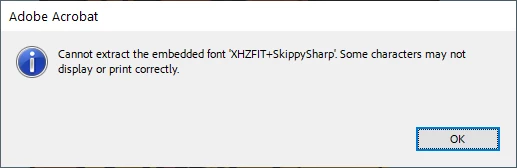
I've had this problem come up several times before and just switched to a different font. But, I got annoyed about it enough this time to actually complain. Please Adobe, I don't care about AI generation. I'd like the programs to work without constant reoccuring bugs like this. Instead of focusing on new bells and whistle, please put some time into making your products reliable.
I saw one solution to this being to use the print option, which I don't see as a real solution. Even if it works, some of us are sending or files to printers that want you to use particular printer description files.
If someone knows a real solution to this please let me know.
Otherwise, Adobe please put more focus on making your programs less buggy.
Copy link to clipboard
Copied
Hi there
Hope you are doing well.
Is this an issue with a particular PDF file or with all the PDFs? Please try with a different PDF file and check. If the file is stored on a shared network/drive please download it to your computer locally and then try again.
What is the version of the OS and the Acrobat DC you are using? To check the version go to Help > About Acrobat and make sure you have the recent version 24.02.20687 installed. Go to Help > Check for updates and reboot the computer once.
Also try to repair the installation from the help menu (Win Only) and see if that works.
Please try to reset the Acrobat preferences as described here https://adobe.ly/3wbUi7w
Also, go through the correct answer marked in the similar discussion https://adobe.ly/4bocPwg and see if that woks.
~Amal
Copy link to clipboard
Copied
Hello Amal,
this problem appears only on Adobe Reader. In my case if I open with Edge or any other reader the pdf file that generates this error, I don't have any problems. I tried to open this file in many other PCs (that have different Windows OS version), like mine now and I have the Acrobat's message warning/error.
My Adobe Reader version is 2024.002.20991 64 bit.
It seems that this notice message, appears after an Adobe's update because I don't have any notice of it from my customers.
I tried to uninstall&install too (by the installation from a "fresh" download of reader_it_install.exe file in my case, because the italian language installation).
Do you have any suggestions please?
Thanks in advance.
Michele
Get ready! An upgraded Adobe Community experience is coming in January.
Learn more