
Exit
  • Global community
    • Language:
      • Deutsch
      • English
      • Español
      • Français
      • Português
  • 日本語コミュニティ
  • 한국 커뮤니티
1

Cannot open password protected PDF in MacOS 12 Monterey

New Here ,
May 31, 2022 May 31, 2022

Dear community,


my customer has recently received a new MacBook with macOS 12. He is currently having the problem of receiving password protected PDFs from another company. When he opens the PDF in Adobe and enters the password, Adobe says the password is incorrect. However, when he opens it in Apple's Preview app and enters the password, he can read the contents. (Yes, we copied and pasted the password to make sure there was no typo).
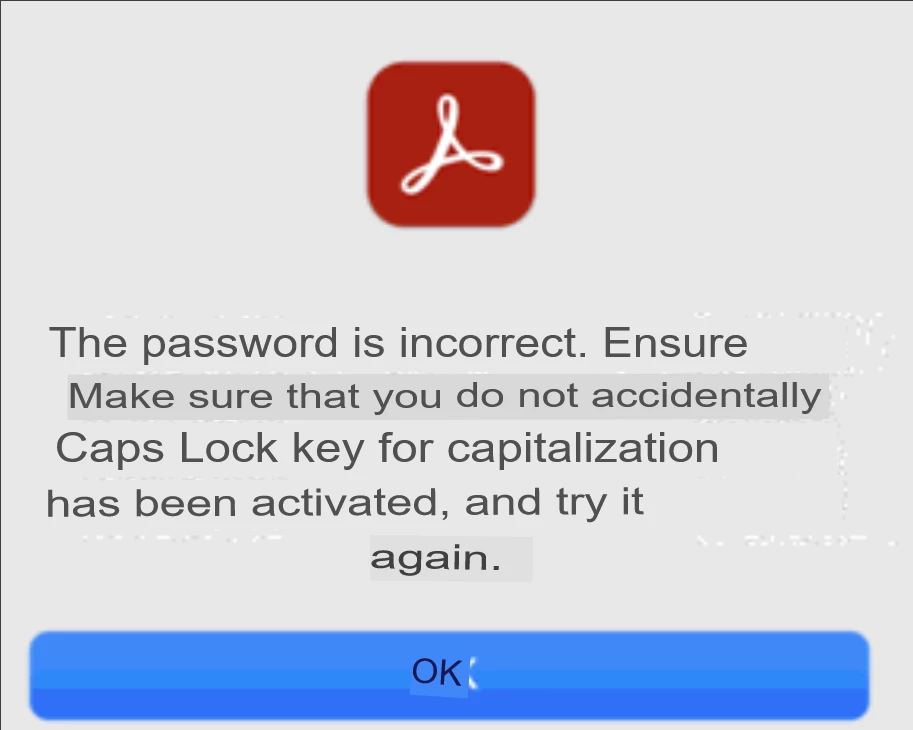
grafik.png

(translated, so the format is strange)

Wenn er nun eine andere Person fragt, die nicht MacOS 12, sondern eine frühere Version von MacOS (z. B. OS 10.11) hat, kann er die Datei ganz normal im Adobe Reader öffnen.


Wir haben festgestellt, dass in der Vorschau-App von MacOS 12 kein Passwort für das Lesen festgelegt ist, sondern nur ein Besitzer-Passwort.
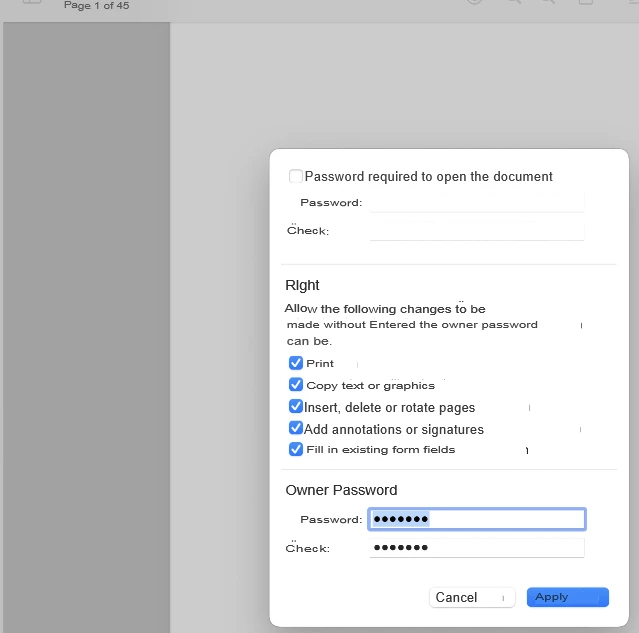
 

Jonathan24669029n4mm_0-1653989083754.png

If we set a new password required to read, we still can't open the PDF in Adobe Reader. However, if we set a new owner password and a new password required to read, we can open the PDF.


Is there something I'm missing so that Adobe skips the required to read password and goes straight to the owner password, or can it only be opened with the password at the beginning (password required to read)


TOPICS
Mac , View PDF
3.9K
Translate
Report
Community guidelines
Be kind and respectful, give credit to the original source of content, and search for duplicates before posting. Learn more
community guidelines
Adobe Employee ,
May 31, 2022 May 31, 2022

Hello,


I hope you are doing well. I am sorry for your experience with Acrobat Reader.


Is this issue with specific files or with all files that are password protected?


If the issue is with all password-protected files, please share a sample file with us so that we can check it at our end and respond better. 


Hoping to hear more from you.


Thanks,

Souvik.

Translate
Report
Community guidelines
Be kind and respectful, give credit to the original source of content, and search for duplicates before posting. Learn more
community guidelines
New Here ,
May 31, 2022 May 31, 2022

Dear Souvik,

thank you very much for your reply, I am fine, I hope you are fine.

So far we have encountered the problem that when trying to open encrypted files from an older macOS system, we could not read them despite entering the correct password. However, if you repeat the steps I wrote above, you were able to make the files readable.

Unfortunately, I don't have a file available at this time, but I will try to get one that we can upload.

Translate
Report
Community guidelines
Be kind and respectful, give credit to the original source of content, and search for duplicates before posting. Learn more
community guidelines
Adobe Employee ,
May 31, 2022 May 31, 2022

Thanks for your response. I tried creating a file and then password-protecting it in the first method that you suggested above. It worked fine on my end.


It could also be how the PDF was created, which could cause the issue. Could you also share a screenshot of the description window of the document you are working with?

Translate
Report
Community guidelines
Be kind and respectful, give credit to the original source of content, and search for duplicates before posting. Learn more
community guidelines
New Here ,
Jun 09, 2025 Jun 09, 2025

Hello, 

I am facing the same issue as described by the other user. However, I am using a MacBook Air M3 and have installed Adobe Acrobat Version 2025. When trying to open pdf files that are password protected, the same message appears as shown by the other user. And no, it's definitely not a password issue, because when I try to open the files with Preview or with another pdf-reader such as PDF Expert, I am able to open the files with the password. 

Since I am not the only one who is facing this issue with Adobe in combination with a MacBook, I wonder if this is an issue that must be solved by Adobe or Mac (Apple), or both?

Who can help?

Thanks in advance for your feedback.

Translate
Report
Community guidelines
Be kind and respectful, give credit to the original source of content, and search for duplicates before posting. Learn more
community guidelines
Adobe Employee ,
Jun 09, 2025 Jun 09, 2025

Hi @steffen_8675,


Hope you are doing well. Sorry for your experience with viewing protected files on Acrobat.


I tried opening a PDF file that was saved with a password, and it worked fine. Do you see this with one particular file?


For further investigation, would you mind sharing a few more pieces of information:

1. The app version of Acrobat (go to Menu > Help > About Acrobat);

2. A screen recording of what you see when trying to open the file;

3. A sample file where you see the issue to test in-house.


Look forward to hearing from you.


Regards,
Souvik.

Translate
Report
Community guidelines
Be kind and respectful, give credit to the original source of content, and search for duplicates before posting. Learn more
community guidelines
New Here ,
Jun 11, 2025 Jun 11, 2025

Dear Souvik,

Thanks for your reply. Let me try to answer all your questions.

  • The problem occurs with all pdf files that are password-protected, not just with one particular. 
  • As mentioned before, the problem only occurs when I try to open pdf with Adobe Acrobat. There is no problem when I use the Mac "Preview" program or other pdf readers like "PDF Expert".
  • I have created a sample file. Please see attached. The password is: 14aA25-R
  • The details about the app version of Acrobat and a screen recording of the error message is included in the sample file attached.


Again, for me it looks like there is a particular problem with the Adobe Acrobat app for Mac. Now, who is going to solve it? Adobe or Apple (or both)?


I look forard to receiving your feedback.


Steffen


Translate
Report
Community guidelines
Be kind and respectful, give credit to the original source of content, and search for duplicates before posting. Learn more
community guidelines
Adobe Employee ,
Jun 12, 2025 Jun 12, 2025

Hi Steffen @steffen_8675,


Thanks for the response.


I copied the password you shared and pasted it, trying to open the file.

It worked fine for me.


Would you mind updating the app to the latest version of the application (2025.001.2052x) and let us know if it works for you?

To do so, go to Menu > Help > Check for Updates.


Let us know how it goes.


Regards,
Souvik.

Translate
Report
Community guidelines
Be kind and respectful, give credit to the original source of content, and search for duplicates before posting. Learn more
community guidelines
New Here ,
Jun 12, 2025 Jun 12, 2025

Hi,

I checked, the latest version is installed.

It's great that it is working for you.

Which operating system are you using (Windows or Mac)? 

And, are you using Adobe with the browser version or app?

Thanks

Steffen

Translate
Report
Community guidelines
Be kind and respectful, give credit to the original source of content, and search for duplicates before posting. Learn more
community guidelines
Adobe Employee ,
Jun 14, 2025 Jun 14, 2025

Hi @steffen_8675,


I tried on all platforms. Windows, Mac, app, and web.

I would really want to understand more on the issue to take this up with the engineering team. 


Would you mind sharing a screen recording of the issue for a better understanding?

Look forward to hearing from you.


Regards,
Souvik.

Translate
Report
Community guidelines
Be kind and respectful, give credit to the original source of content, and search for duplicates before posting. Learn more
community guidelines
New Here ,
Nov 13, 2025 Nov 13, 2025

I have the same issue when using the Enterprise version of Adobe on a Mac Studio (M1 Ultra chip) 

I can see a password-protected document if opened in preview or using another reader such as PDF Expert, but I cannot open the document in Adobe Enterprise.

I think the issue is a bug with Adobe Enterprise and the M1 chip.

I have seen a work-around to disable "Enable native OS mode for optimal performance" but this option is not in my version of Adobe Enterprise (2025.001.20756)

Is there a solution to resolve this?

Translate
Report
Community guidelines
Be kind and respectful, give credit to the original source of content, and search for duplicates before posting. Learn more
community guidelines
Adobe Employee ,
Nov 17, 2025 Nov 17, 2025
LATEST

Hi Bazza2712,


Thank you for reaching out, and sorry to hear that you are experiencing the same issue.


When you say Adobe Enterprise, are you referring to the Acrobat Pro application? 

To investigate this behaviour, we would require more information. Please share the following information:

- Share a small video showing how it opens in preview and what happens when opening in the application.

- Does it happen only with a password-protected PDF?

- How was the password added to the PDF?

- Share the current Acrobat and OS version on your Mac. You may use the steps suggested here: https://adobe.ly/49XBKsQ

- Share the screenshot of the error message, if any.


This information would help us to understand and replicate the issue on our end. 


Thanks,

Meenakshi


Translate
Report
Community guidelines
Be kind and respectful, give credit to the original source of content, and search for duplicates before posting. Learn more
community guidelines