

Custom Hyperlinks no longer work in Reader DC or XI
Hi There
We have a custom built application called HowNow that utilizes custom hyperlinks to open documents directly from our software. In all previous version of Adobe Reader this functionality was working correctly but is borken in the later verisons.
The way we setup the custom links to to create a registry get under HKCR that tell windows how to open our hyperlinks. I've modified the registry key to launch to Microsoft Excel instead for the example below.
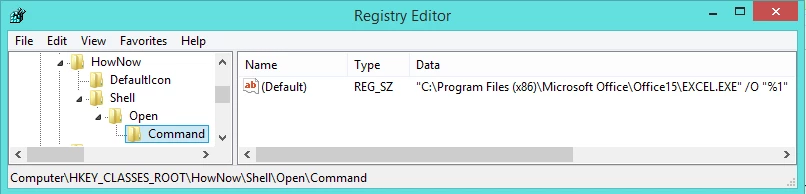
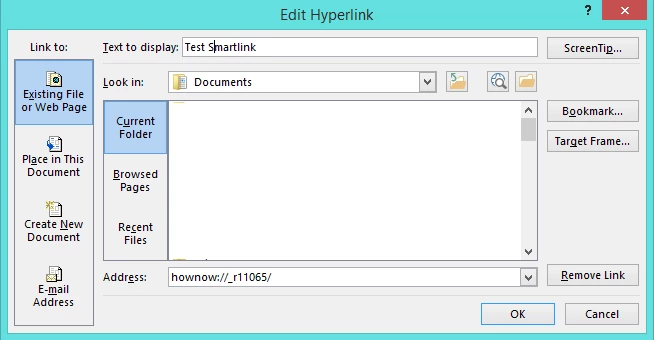
When we add a hyperlink to a document the address will look like this: hownow://_r11065/. The HowNow prefix tells windows to look for the HowNow registry key above, the number on the end is the index of the file to be opened.
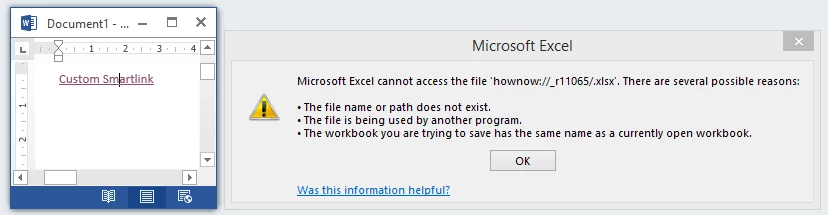
Now if I add this hyperlink into a word document and click to follow it, excel will launch and give me a message that the file couldn't be opened. Obviously it doesn't know what do do with the document Id but shows that the hyperlink works and launched the selected application in the 'command' registry key.
However when editing a PDF in Adobe DC and adding in the exact same link the results in the below IE security message prompt to allow Excel to open the file. This wouldn't be too bad but when using any other browser such as Firefox or Chrome this dialog doesn't appear and you get a blank browser page.

If it helps with debugging the problem you can replicate the above scenario internally if you can create the registry keys from the screenshot above. You'll just need to edit the path in the command default key and point it to an application like Excel relevant to your environment.
I've looked through the forums, made preference changes, edited the hyperlink properties and cannot find a way to allow our custom links to work like they used to...
Why is Adobe Reader opening up the default browser and asking it handle the hyperlink and not simply letting the OS to handle it? All other application seam to do this and so did previous version of Reader. (e.g Office products)?
Any assistance or suggestion on how we might fix this issue would be greatly appreciated.


 AdChoices