
Disabledg
Participant
January 25, 2018
Answered

Duplex print small page

  • January 25, 2018
  • 1 reply
  • 828 views

Hello! I have a strange issue with Acrobat Reader DC 2018.0009 . When i print document with duplex - one side is normal but the other side is small in corner of paper. From another programs same document duplex print correct. Photo of page in attachment.

On the another pc with same AR DC and printer - problem not exist.

I remove AR DC and install it again - but problem still exist. What can it be?
https://i.imgur.com/2Y9mlIs.jpg

This topic has been closed for replies.
Correct answer Adorobat

Hi Disabledg,

Sorry for the delay in response.

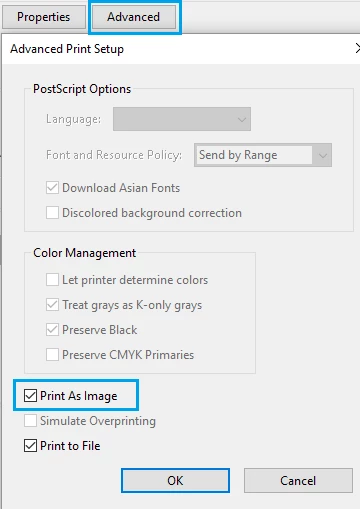
Could you please try printing pdf as image and see if that helps? Click "Advanced" next to printer's properties >

check the box which says "Print as image". Below is a screenshot:

Also, let us know the operating system you have on the machine?

Thanks,

Shivam

1 reply

Adorobat
Community Manager
Community Manager
January 25, 2018

Hi Disabledg,

Please try following troubleshooting steps:

1- Check if Reader is updated to the latest patch- click check for updates under help menu.

2- If it is, remove Reader using cleaner tool which you can download from here: Download Adobe Reader and Acrobat Cleaner Tool - Adobe Labs , reboot the machine, download Reader DC from here: Adobe Acrobat Reader DC Install for all versions

3- Reboot the machine and try again.

Thanks,

Shivam

Disabledg
DisabledgAuthor
Participant
January 26, 2018

Problem still exist. And from another profile on this pc - print correct.

Adorobat
Community Manager
AdorobatCommunity ManagerCorrect answer
Community Manager
February 15, 2018

Hi Disabledg,

Sorry for the delay in response.

Could you please try printing pdf as image and see if that helps? Click "Advanced" next to printer's properties >

check the box which says "Print as image". Below is a screenshot:

Also, let us know the operating system you have on the machine?

Thanks,

Shivam