
Participating Frequently
April 26, 2022
Question

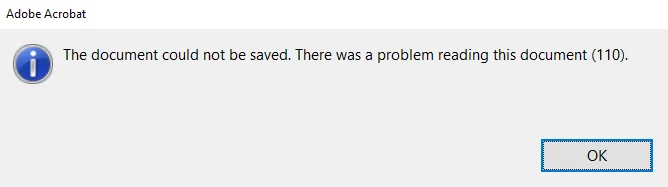
Error 110 on Acrobat Reader DC 2022 (PC)

  • April 26, 2022
  • 4 replies
  • 9633 views

Hi

We have continual issue with the metadata within Adobe PDF files with the most recent update 2022.001.20117.

Whilst the workaround is to open your PDF file using the Chrome web browser and then saving the file via the Print option, this should not be a permanent solution.

Any other ideas on how to fix this??

Thanks
This topic has been closed for replies.

4 replies

JR Boulay
Community Expert
Community Expert
April 27, 2022

MOVED TO THE ACROBAT READER FORUM

Acrobate du PDF, InDesigner et Photoshopographe
Participating Frequently
May 16, 2022

Hi Team

Any update on this??

Amal.
Community Manager
Community Manager
June 3, 2022

Hi Amal,

This is not a viable solution as this is happening to all new PDFs and all exisiting PDFs that have already been saved.

Is there another solution that can be propsed as printing to PDF wrecks the formatting if the PDF is edited again 


Hi there


We are sorry to keep you waiting.


Please try to turn off the protected mode for testing (Win Only) and see if that works. Go to Edit > preferences > Enhanced Security > Uncheck 'Enable Protected mode at startup'  Turn Off the Protected mode and uncheck 'Enhanced Security' > Click OK and reboot the computer once and check.

Note: Please turn on the security after testing to avoid any security risk


If the above works for you please try to add the PDF file to the whitelist Go to Edit > preferences > Enhanced Security > Add file and Add folder path and click OK.


Regards

Amal

Bernd Alheit
Community Expert
Community Expert
April 27, 2022

Press the ctrl key and click on the OK button. What does you get?

Participating Frequently
April 28, 2022

No luck with these steps i'm afriad 


Amal.
Community Manager
Community Manager
April 29, 2022

Hi there,


We are sorry to hear that, this issue generally occurs when the PDF files get corrupted due to many reasons.


Please try to recreate the PDF from the original source file and see if that works for you.


~Amal

Participating Frequently
April 27, 2022

Hi Amal,

We are trying to save PDF files downloaded from one of our systems and also pre saved PDF files located locally.

Due to security we cannot share such information.

We are opening the files in the Adobe Acrobat DC client 2022


Amal.
Community Manager
Community Manager
April 27, 2022

Hi there


Hope you are doing well and sorry to hear that.


Would you mind sharing the steps you are doing and getting this error message? A small video recording of the issue would be very helpful.


Are you trying to open the PDF file in the web browser? If yes, web browser uses their own PDF mechanism and they are not Adobe dependent. Please try to download the file to your computer locally and then try to open it via Acrobat/Reader DC application and check if that helps. 


Let us know if you are referring to something else.


Regards

Amal