Participant
June 2, 2023
Answered

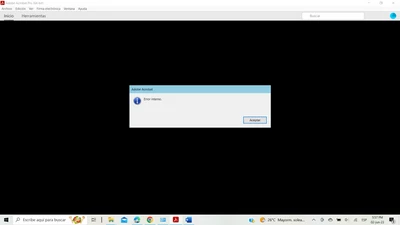
Error interno Adobe Acrobat

  • June 2, 2023
  • 1 reply
  • 1536 views

Hola! 

Favor solicito su ayuda. 

De un dia para otro la aplicación no responde bien:

1.- Aparece error interno al dar clic en cualquier pestaña  y no se desaparece al poner " aceptar" sino que continua marcando error interminables veces hasta que se bloquea la aplicación.

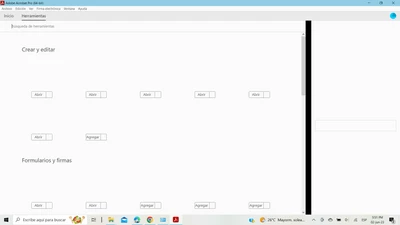
2.- No aparece información de los iconos.

3.- No puedo hacer nada en la pantalla porque se bloquea. 


Estas sonlas fotos de como me aparece:


Ya probe con desintalar e intalar de nuevo a través d lea plataforma varias veces y también ya intente seguir pasos de otros casos de soporte tecnico limpiando todo lo relacionado con Adobe del equipo y volviendo a instalar la aplicación a traves de este enlace :


https://helpx.adobe.com/acrobat/kb/acrobat-dc-downloads.html


Nada me sirve, por favor ayuda! 

This topic has been closed for replies.
Correct answer AkanchhaS8194121

Hi @Gabriela302493864p12 


Sorry to hear about the trouble caused, and thanks for sharing the troubleshooting steps performed so far.

The screenshot above shows that the Tools menu is not loading correctly, and the display is distorted. 

If uninstall reinstall didn't work, then reset the following preferences and close Acrobat first then go to

user/appdata/local and delete Adobe folder and

user/appdata/roaming and delete the Adobe folder in there


When nothing works, try these solution step-by-step

1- Reboot the computer

Run this cleaner tool to remove the existing installer and application’s file traces:

https://www.adobe.com/devnet-docs/acrobatetk/tools/Labs/cleaner.html

Download the Acrobat installer from here:

https://helpx.adobe.com/acrobat/kb/acrobat-dc-downloads.html

2- Right-click on the Acrobat icon and Run as Administrator 

3- Else, Create a Hidden Admin account and try launching the Acrobat there. If it launches successfully there, that means a problem with the user profile. 

https://answers.microsoft.com/en-us/windows/forum/all/how-to-enable-the-hidden-administrator-in-windows/0a8e3cf5-4f62-4f2a-b49f-4c9cbbc6d154 


Thanks,

Akanchha 


1 reply

AkanchhaS8194121
AkanchhaS8194121Correct answer
Legend
June 6, 2023

Hi @Gabriela302493864p12 


Sorry to hear about the trouble caused, and thanks for sharing the troubleshooting steps performed so far.

The screenshot above shows that the Tools menu is not loading correctly, and the display is distorted. 

If uninstall reinstall didn't work, then reset the following preferences and close Acrobat first then go to

user/appdata/local and delete Adobe folder and

user/appdata/roaming and delete the Adobe folder in there


When nothing works, try these solution step-by-step

1- Reboot the computer

Run this cleaner tool to remove the existing installer and application’s file traces:

https://www.adobe.com/devnet-docs/acrobatetk/tools/Labs/cleaner.html

Download the Acrobat installer from here:

https://helpx.adobe.com/acrobat/kb/acrobat-dc-downloads.html

2- Right-click on the Acrobat icon and Run as Administrator 

3- Else, Create a Hidden Admin account and try launching the Acrobat there. If it launches successfully there, that means a problem with the user profile. 

https://answers.microsoft.com/en-us/windows/forum/all/how-to-enable-the-hidden-administrator-in-windows/0a8e3cf5-4f62-4f2a-b49f-4c9cbbc6d154 


Thanks,

Akanchha