
Participant
March 8, 2018
Answered

Error pantalla completa Adobe Reader

  • March 8, 2018
  • 3 replies
  • 12890 views

Buenos días.

Tengo un problema con Adobe Reader. Poseo un Lenovo Yoga 910, y puedo usarlo como ordenador, o abatiendo la pantalla como Tablet. Mi problema viene al usarlo como Tablet y abrir un documento PDF en pantalla completa, que su programa se queda con la pantalla en negro, sin embargo al abrirlo sin abatir la pantalla no da ningún problema. Me gustaría saber si saben de alguna solución a dicho problema ya que me es necesario para el trabajo el poder usarlo como Tablet y el poder abrir catalogos en PDF.

Muchas gracias.
    This topic has been closed for replies.
    Correct answer AkanchhaS8194121

    Hi Juangreca,

    We apologize for the delay in response to your query.

    If you are still experiencing the same problem, then you may check the following.

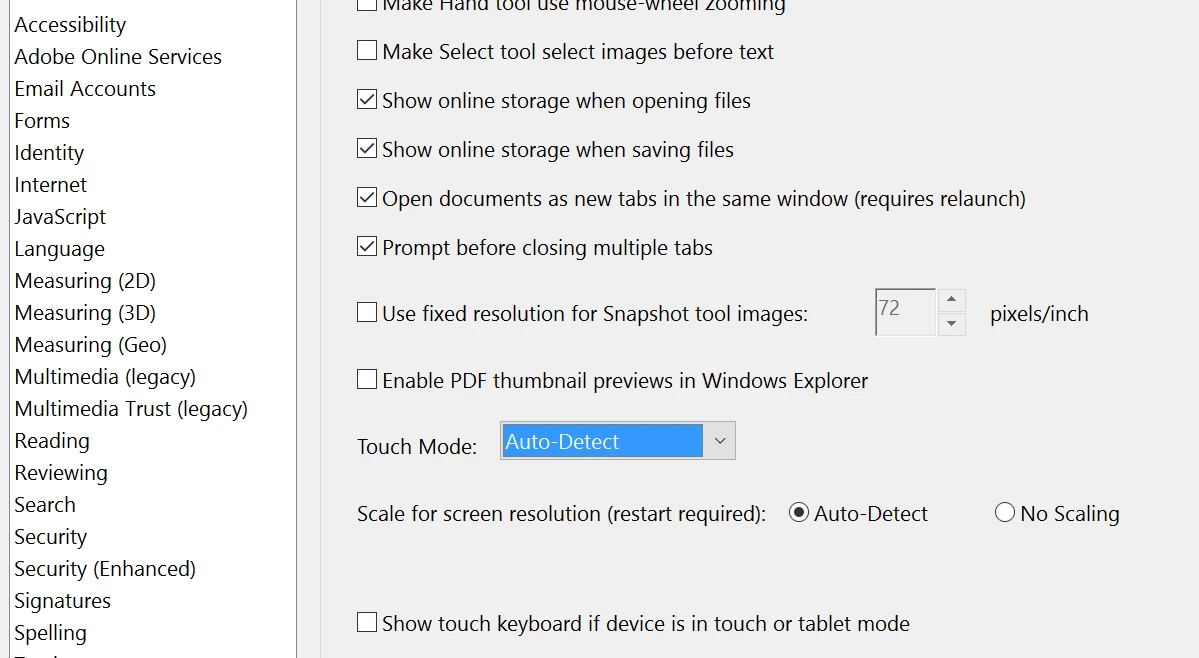
    Open Adobe Reader and go to its preferences setting- Adobe Reader>Edit>Preferences>General> Check "Touch Mode" & "Show touch keyboard if devices is in touch or tablet mode"

    If this doesn't make change then you may share the exact version of application, Open Adobe Reader> Help> About Adobe Reader.

    And the exact build of your device.

    If possible, please share the screen recording of Reader's full screen mode, when its working fine and when it doesn't.

    This would be helpful for us to understand the issue correctly.

    Regards,

    Akanchha 

    3 replies

    Participant
    February 19, 2024

    Buen dia

    Quisiera saber porque ahora en GooglePlay me indica no su programa o app no es compatible?? =(


    Participant
    March 18, 2021

    Buenos días, Para solucionarlo deben actualizar DirectX, visual c++  y silverlight, desde el panel de control, Panel de control\Programas\Programas y características, si no lo tienen instalado, procedan a instalarlo, esto corregirá el problema, pueden empezar sólo actualizando o instalando DirectX.

    Good Mornig, for solve this problem you need update DirectX, visual c++  y silverlight, please entry to: 

    and update those programs.

    You can also probe installing DiretX first.

    AkanchhaS8194121
    AkanchhaS8194121Correct answer
    Legend
    April 27, 2018

    Hi Juangreca,

    We apologize for the delay in response to your query.

    If you are still experiencing the same problem, then you may check the following.

    Open Adobe Reader and go to its preferences setting- Adobe Reader>Edit>Preferences>General> Check "Touch Mode" & "Show touch keyboard if devices is in touch or tablet mode"

    If this doesn't make change then you may share the exact version of application, Open Adobe Reader> Help> About Adobe Reader.

    And the exact build of your device.

    If possible, please share the screen recording of Reader's full screen mode, when its working fine and when it doesn't.

    This would be helpful for us to understand the issue correctly.

    Regards,

    Akanchha 

    Participant
    January 15, 2021

    Queremos una solución al problema de la pantalla negra. Con este problema, es un programa totalmente obsoleto.

    DENNOS UNA SOLUCIOOOON!!!! GRACIAAAAAS!

    Participant
    March 15, 2021

    encontre esto en otro post y me funcionó 

    I found this fix in another thread and it fixed the same issues you are having that I was having as well:

    Right-click on your Acrobat Reader DC icon on the desktop or navigate to the AcroRd32.exe file in this folder
    C:\Program Files (x86)\Adobe\Acrobat Reader DC\Reader

    Choose "Troubleshoot Compatibility." Tell the troubleshooter to run this program in Windows 7 compatability mode.

    It now works perfectly. NOTE: AcroRd32.exe is a 32bit program -- that's why it's in the (x86) folder. For some reason, Win10 won't run it properly.


    en pocas palabras dale click  derecho en el icono del escritorio>>>propiedades>>>>compatiblidad>>>>ejecutar este programa en modo de compatibildad para:>>>> windows 7


    Ami me funcionó.


    Saludos