Participant
October 5, 2025
Answered

Error "AdobeCollabSync.exe - Entry Point Not Found" on 25.001.20756 in Windows 7.

  • October 5, 2025
  • 1 reply
  • 7236 views

After install 25.001.20756, show dialog

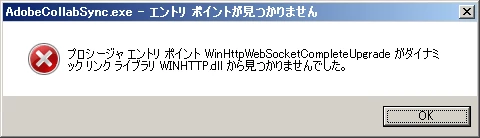
"AdobeCollabSync.exe - Entry Point Not Found

The procedure entry point WinHttpWebSocketCompleteUpgrade

could not be located in the dynamic link library WINHTTP.dll."

I can view PDF when ignore this error.

Win32API WinHttpWebSocket* support : Win8/Server2012 or later.

WinHttpWebSocketCompleteUpgrade 

25.001 20744 is no issue.

Correct answer AnandSri

Hallo AnandSri,

Ich bekomme den beschriebenen Error beim Start von Windows 7, was zu Beinträchtigungen führt. Ich habe alle Ihre vorgeschlagenen Optionen probiert, leider ohne Erfolg.

Unter msconfig ist AdobeCollabSync nicht zu finden. Ebenso unter Adobe habe ich die genannte Option deaktiviert. Scliesslich habe ich Reader 2 mal deinstalliert und neu installiert. Kein Erfolg. Ist dieser Error nicht zu beheben ?

Vielen Dank und Grüsse

Yildiz


Hello @10392458


Thank you for your detailed follow-up and for trying all the suggested steps. The error message is caused by a compatibility issue. The WinHttpWebSocketCompleteUpgrade API is only available on Windows 8 and later. Since you're using Windows 7, this API is not present in your system WINHTTP.dll, which causes AdobeCollabSync.exe to fail at startup.


Disable cloud sync features in Acrobat:

  • Open Adobe Acrobat Reader.
  • Go to Menu > Preferences > General.
  • Uncheck “Show online storage when saving files” and “Show online storage when opening files”.
  • Restart Acrobat.

Rename the executable:

  • Navigate to:
    C:\Program Files (x86)\Adobe\Acrobat Reader DC\Reader\
  • Find AdobeCollabSync.exe, right-click and rename it to AdobeCollabSyncOLD.exe.
  • This prevents it from launching, though it may be restored after future updates.
  • Please note that the above path may differ depending on the version installed.

The recommendation would be upgrading the OS.


Thanks,

Anand Sri.

1 reply

creative explorer
Community Expert
Community Expert
October 6, 2025

@Yuka_Kagami Windows 7? That's your issue!"The "AdobeCollabSync.exe - Entry Point Not Found The procedure entry point WinHttpWebSocketCompleteUpgrade could not be located in the dynamic link library WINHTTP.dll."

is a network-related API that was introduced in Windows 8 / Windows Server 2012 and is not present in the original WINHTTP.dll on Windows 7.

It might be time to upgrade!

m
Participant
October 6, 2025

Adobe Acrobat Reader system requirement

> Windows 11 (64 bit)

> Windows 10 version 1809 or later (32 bit and 64 bit)

> Windows 8, 8.1 (32 bit and 64 bit)

> Windows 7 SP1 (32 bit and 64 bit)


System requirement changes 

> 25.001.20756 None


AnandSri
AnandSriCorrect answer
Legend
October 13, 2025

Hallo AnandSri,

Ich bekomme den beschriebenen Error beim Start von Windows 7, was zu Beinträchtigungen führt. Ich habe alle Ihre vorgeschlagenen Optionen probiert, leider ohne Erfolg.

Unter msconfig ist AdobeCollabSync nicht zu finden. Ebenso unter Adobe habe ich die genannte Option deaktiviert. Scliesslich habe ich Reader 2 mal deinstalliert und neu installiert. Kein Erfolg. Ist dieser Error nicht zu beheben ?

Vielen Dank und Grüsse

Yildiz


Hello @10392458


Thank you for your detailed follow-up and for trying all the suggested steps. The error message is caused by a compatibility issue. The WinHttpWebSocketCompleteUpgrade API is only available on Windows 8 and later. Since you're using Windows 7, this API is not present in your system WINHTTP.dll, which causes AdobeCollabSync.exe to fail at startup.


Disable cloud sync features in Acrobat:

  • Open Adobe Acrobat Reader.
  • Go to Menu > Preferences > General.
  • Uncheck “Show online storage when saving files” and “Show online storage when opening files”.
  • Restart Acrobat.

Rename the executable:

  • Navigate to:
    C:\Program Files (x86)\Adobe\Acrobat Reader DC\Reader\
  • Find AdobeCollabSync.exe, right-click and rename it to AdobeCollabSyncOLD.exe.
  • This prevents it from launching, though it may be restored after future updates.
  • Please note that the above path may differ depending on the version installed.

The recommendation would be upgrading the OS.


Thanks,

Anand Sri.