
Participant
December 23, 2020
Answered

Fill & Sign Question - Is there anyway to disable autofill/autocomplete when adding text?

  • December 23, 2020
  • 1 reply
  • 2933 views

Good day to you.

Is there anyway I can disable the auto-fill portion when in Fill & Sign under annotations like adding text? The reason is the users need to key in their userid and sometimes they accidentially choose the wrong id when doing the signing. Please take a look below.
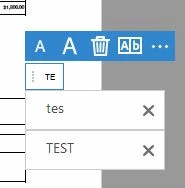
 

Tried to disable the forms auto-complete, but I think this is not the correct option. The only option is to "cross" out the particular text. Is there anyway to disable this entirely instead?

We are using Adobe Reader DC 2020.013.20074


Thank you.
This topic has been closed for replies.
Correct answer Bernd Alheit

Sign in at:

https://documentcloud.adobe.com/link/home/ 

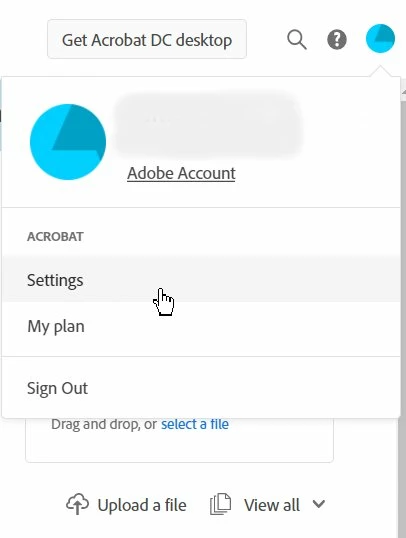
and change Settings at your account.

1 reply

Bernd Alheit
Community Expert
Bernd AlheitCommunity ExpertCorrect answer
Community Expert
December 23, 2020

Sign in at:

https://documentcloud.adobe.com/link/home/ 

and change Settings at your account.

Ong5FE2Author
Participant
December 28, 2020

Thank you.

It works.

Just curious is there anyway to disable that setting without an Adobe ID or account?

Bernd Alheit
Community Expert
Community Expert
December 28, 2020

I don't know.