
Exit
  • Global community
    • Language:
      • Deutsch
      • English
      • Español
      • Français
      • Português
  • 日本語コミュニティ
  • 한국 커뮤니티
0

Fillable PDF

New Here ,
Jul 17, 2018 Jul 17, 2018

I found how to convert a document to a fillable PDF however am having issues I can't resolve.  I can draw a text box in an area of the document that needs it.  However, when I test it out, the words appear over half way down the text field.  In addition, they just continue going across the page, never moving up or down, just continuing until you can't even see the words anymore, but you still have the ability to keep typing. 
566
Translate
Report
Community guidelines
Be kind and respectful, give credit to the original source of content, and search for duplicates before posting. Learn more
community guidelines

correct answers 1 Correct answer

Adobe Employee , Jul 17, 2018 Jul 17, 2018

Hello Dawns,

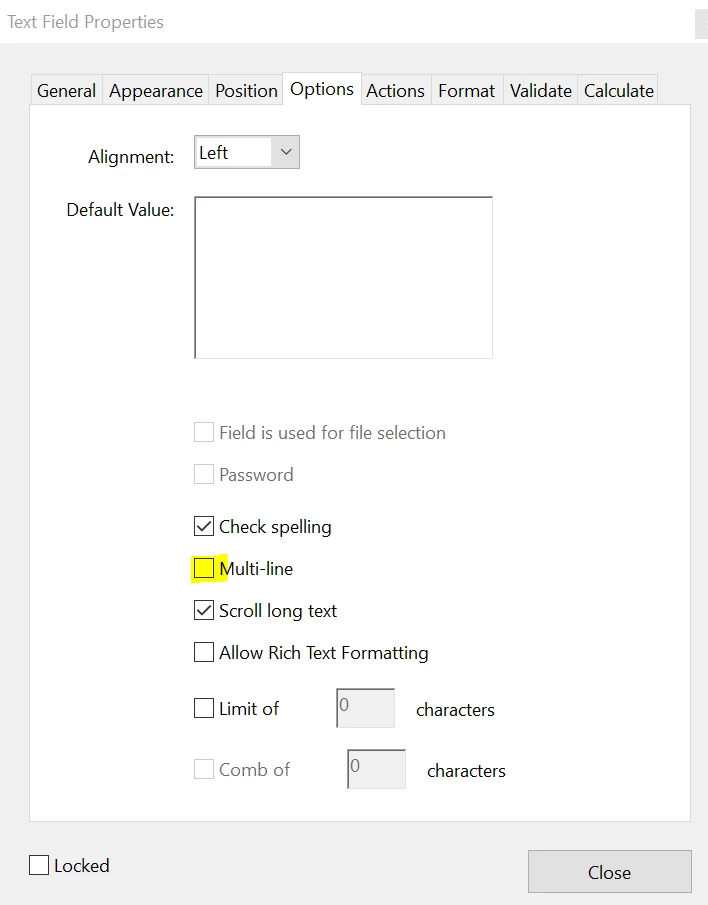
We're sorry for the trouble you had, please go to the test field properties by double-clicking the field>options>and choose 'Multi-line'>Click Close.

For details information about the form field properties, you can refer to Adobe article PDF form field properties, Adobe Acrobat

Let us know how it goes and share your observation.

Thanks,

Anand Sri.

Translate
Adobe Employee ,
Jul 17, 2018 Jul 17, 2018
LATEST

Hello Dawns,

We're sorry for the trouble you had, please go to the test field properties by double-clicking the field>options>and choose 'Multi-line'>Click Close.

For details information about the form field properties, you can refer to Adobe article PDF form field properties, Adobe Acrobat

Let us know how it goes and share your observation.

Thanks,

Anand Sri.

Translate
Report
Community guidelines
Be kind and respectful, give credit to the original source of content, and search for duplicates before posting. Learn more
community guidelines