
Participant
February 6, 2018
Answered

Fonts issues

  • February 6, 2018
  • 2 replies
  • 1571 views

Hi all,

We are using acrobat reader DC 2018.009.20044 MUI and also installed the fonts pack and DC Spelling Dictionary Pack

We have a PDF generated file in Hebrew that for some reason the letters show like this:
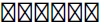
Also when I check the document properties I see this:
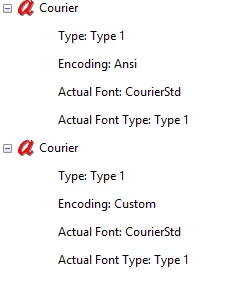
When I try to open this font in Word for example it finds the font as Courier New and I see the text correctly.

I am at a loss because when trying to open this on the smartphone application I see the text correctly

Thanks in advance.

    This topic has been closed for replies.
    Correct answer AnandSri

    Hello rahamiml76549843

    Thank for the sharing the document. After checking the file at our end, it seems to be a font issue as the font from the original SAP  file is not getting embedded after getting converted into PDF.

    Please contact the vendor SAP and check with them, that when you convert the file into PDF, the fonts are not getting embedded. They will be able to provide you instructions for embedding the font from the source file.

    Feel free to update this discussion for any further assistance.

    Regards,

    Anand Sri.

    2 replies

    AnandSri
    Community Manager
    AnandSriCommunity ManagerCorrect answer
    Community Manager
    February 12, 2018

    Hello rahamiml76549843

    Thank for the sharing the document. After checking the file at our end, it seems to be a font issue as the font from the original SAP  file is not getting embedded after getting converted into PDF.

    Please contact the vendor SAP and check with them, that when you convert the file into PDF, the fonts are not getting embedded. They will be able to provide you instructions for embedding the font from the source file.

    Feel free to update this discussion for any further assistance.

    Regards,

    Anand Sri.

    Participant
    February 13, 2018

    Thank you for your help.

    Rahamim

    AnandSri
    Community Manager
    Community Manager
    February 9, 2018

    Hello rahamiml76549843

    As per the description above, you are not able to read a PDF file which is in Hebrew, Is that correct?

    Please check for any pending updates of Adobe Reader DC from Help>Check for updates, reboot the machine after the installation of updates. You can also repair the installation files of Adobe Reader DC from Help>Repair installation(only for Windows). Reboot the machine and see if this brings any difference.

    If the issue still persists, is it possible to share the PDF file with us so that we can try it at our end? To share PDF file, please use the Adobe Send feature, share the link via private message. How Do I Send Private Message Link: https://forums.adobe.com/thread/1184148

    Let us know how it goes.

    Regards,

    Anand Sri.