Answered
How can I cancel the service?
Hi! I downloaded Acrobat, but have decided I don't need/want it. during the first days, I kept getting reminders (ie 4 days left), but now i have no idea how to do it. Suggestions? Thanks, xo E

Hi! I downloaded Acrobat, but have decided I don't need/want it. during the first days, I kept getting reminders (ie 4 days left), but now i have no idea how to do it. Suggestions? Thanks, xo E
Hi Elizabeth,
If I remember well, you can cancel during the first 30 days without fees. As https://forums.adobe.com/people/Test%20Screen%20Name said, if you didn't give your credit card credentials, the non-payment will cancel your subscription.
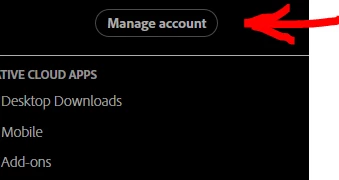
If, however, your credit card information are known to Adobe, you need to cancel. You cancel by logging-in into your account at adobe.com. Under your name is the "Manage account" button:
These are the cancellation terms:
Service begins as soon as your initial payment is processed. You'll be charged the rate stated at the time of purchase, plus applicable taxes (such as value added tax when the stated rate doesn't include VAT), every month for the duration of your annual contract. If the applicable VAT rate (or other included tax or duty) changes during your one-year term, the tax-inclusive price will adjust accordingly. Your contract will renew automatically, on your annual renewal date, until you cancel. Renewal rates are subject to change, but we'll always notify you beforehand. If you cancel within 14 days of your order, you'll be fully refunded. Should you cancel after 14 days, you'll be charged 50% of your remaining contract obligation and your service will continue until the end of that month's billing period. Cancellations can be made any time by visiting your Manage Account page or by contacting Customer Support.
Already have an account? Login
Enter your E-mail address. We'll send you an e-mail with instructions to reset your password.
 AdChoices