
Jayna45
Participant
January 3, 2018
Answered

How can I customize the Tools Pane (Right Side) in Adobe Reader DC?

  • January 3, 2018
  • 3 replies
  • 9420 views

I need to be able to add the Certificates app and if possible remove the Fill & Sign and Send for Signature tools.  I've been looking at the .aapp files and the registry entries they create, but can't seem to alter which ones load into the right hand pane.  We use a 3rd party digital certificate across multiple applications for signing documents and I'm trying to make it easier for users to access this tool in Reader DC.
    This topic has been closed for replies.
    Correct answer glennk1971

    I discovered what I was doing wrong.

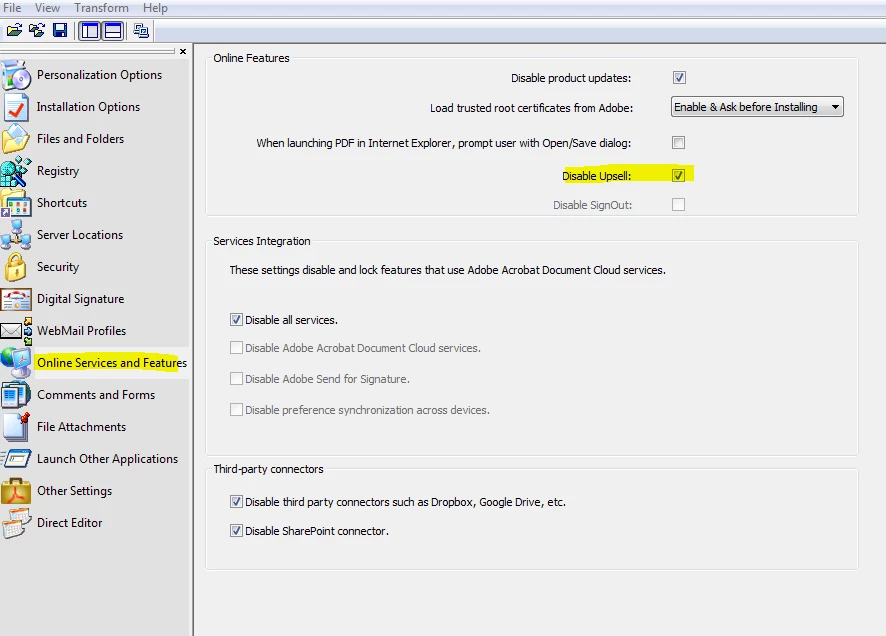
    I needed to Disable Upsell within Online Services and Features and also disable online services so that removes teh sign in option.

    Now works as I wanted it to!

    3 replies

    AnandSri
    Community Manager
    Community Manager
    January 10, 2018

    Hello johnr007

    Sorry for the delay in response to your query and apologize for the inconvenience caused. You have to edit the registry entry for the tool you want to hide which are mentioned in the KB doc Tools Customization — Acrobat Customization Wizard DC for Windows

    I have also sent you a private message, please check your email inbox.

    Regards,

    Anand Sri.

    Participant
    July 24, 2019

    Hello Anand,

    I am facing a lot of problems with Adobe reader DC and this is one of them. I need to add a custom tool bar button (Add-on Tool) to the right hand side tools pane. Can you tell me the steps to do it? Also, the link you have mentioned does not exist anymore.

    Thanks in advance for your help!

    Regards,

    Abiram V.

    Jayna45
    Jayna45Author
    Participant
    January 3, 2018

    Hi Anand,

    I've looked at both those documents.  Regarding the first link - The tools in my Tools tab only offer "Open" and "Learn more" on the drop down buttons, they do not offer Add/Remove Shortcut:

    For the second link, I've been able to unpack the .exe and load the .msi file into the customization wizard, but none of the settings match the pictures on this page, and there is no reference to the customizing the tools pane in the wizard itself:

    glennk1971
    Participant
    January 29, 2018

    Hi-

    I have the same problem.

    Windows 7

    Acrobat Reader DC 2015.023.20070 (15.03.20070.19033)

    I want to create an MSI installer for SCCM 2012 which is fine. I can do that, but what I need to remove from the install are the following:

    Sign in - We dont want our users to sign in

    Remove Tools from the Tools Pane: We dont want our users clicking ADD and then attempting to purchase the tools.

    I have seen the Acrobat Customization Wizard DC, and understand that there is a reg setting to modify,

    HKLM\SOFTWAR\Policies\Adobe\(productname)\(version)\FeatureLockDown\cAcroApp\cDisabled

    However when looking for this on the wizard, the entry is not there, nor is it on the local machine

    Can somepne kindly advise the way I can remove the sign in and the Tools options for Acrobat DC please so that I can deploy to the userbase?

    Many thanks

    GK

    glennk1971
    glennk1971Correct answer
    Participant
    January 29, 2018

    I discovered what I was doing wrong.

    I needed to Disable Upsell within Online Services and Features and also disable online services so that removes teh sign in option.

    Now works as I wanted it to!

    AnandSri
    Community Manager
    Community Manager
    January 3, 2018

    Hello Johnr,

    As per the description above, you want to customize the right had tools pane in Adobe Reader DC, Is that correct?

    Please refer and try the suggestions in the following KB doc Tools Customization (DC)

    You may also refer to Tools Customization — Acrobat Customization Wizard DC for Windows

    Let us know how it goes.

    Regards,

    Anand Sri.