sambusac
Participant
June 29, 2015
Answered

how do i change font size in adobe acrobat reader dc?

  • June 29, 2015
  • 3 replies
  • 198587 views

In my previous version, Adobe Reader X, the menu bar had a tab for setting the font size to any % desired. I don't see that anywhere on this new version.

This topic has been closed for replies.
Correct answer RahulTyagi_

Hi sambusac,

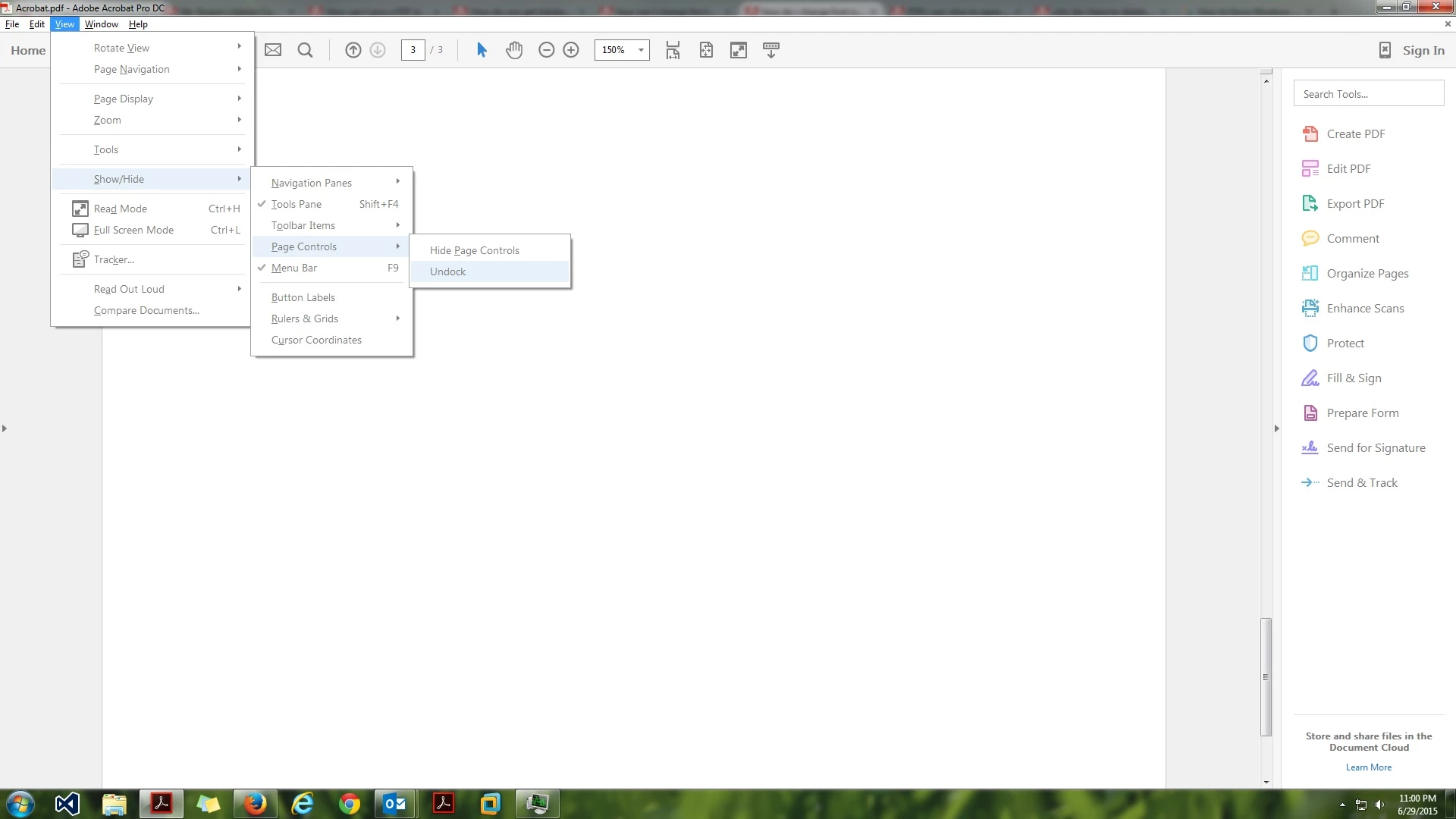
Go to View-> Show/Hide-> Page Controls-> Uncheck 'Undock' and the option above should be 'Hide Page Controls'. Please refer the following Image :
If you want to change font size while you are editing the file :

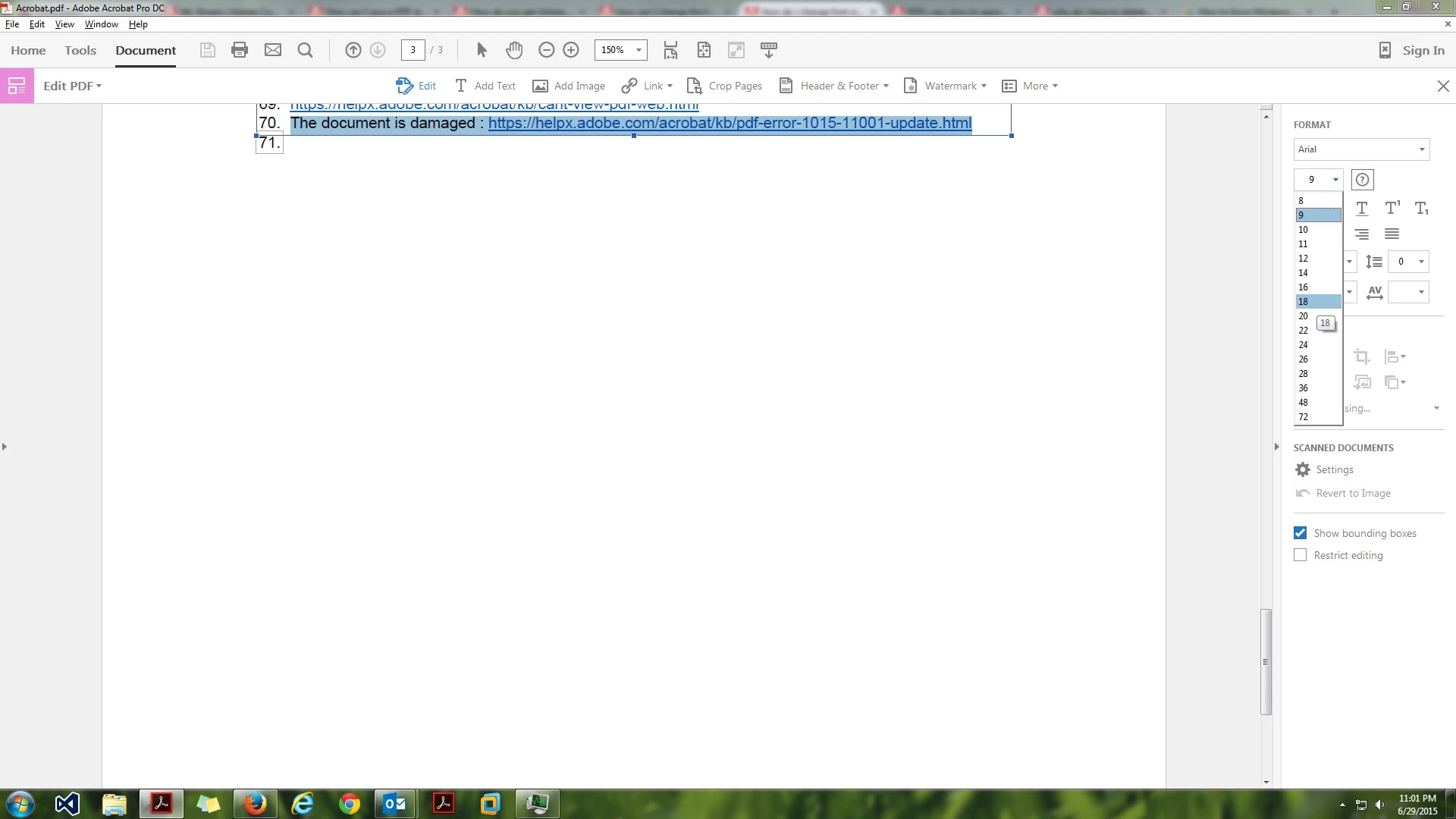
You can do so by clicking on the Edit PDF option on the right hand side pane and then you can choose font size under Format options.
Hope that helps.

Regards,

Rahul

3 replies

Participant
February 5, 2020

None of the above given solutions seems to be working here.

[Private info removed]

Participant
April 12, 2020

Maybe it is worth noting:

They don't work for me either, but I think that's because Editing(changing font size) a pdf in adobe is a feature that you have to pay for. And I'm only running the free version and features of Adobe.

Regards

Martins, Roelf

RahulTyagi_
RahulTyagi_Correct answer
Participating Frequently
June 29, 2015

Hi sambusac,

Go to View-> Show/Hide-> Page Controls-> Uncheck 'Undock' and the option above should be 'Hide Page Controls'. Please refer the following Image :

If you want to change font size while you are editing the file :

You can do so by clicking on the Edit PDF option on the right hand side pane and then you can choose font size under Format options.

Hope that helps.

Regards,

Rahul

Participant
April 22, 2020

Edit PDF option just opens the browser page to get a paid version. Do you have the feature in the free version?

try67
Community Expert
Community Expert
April 22, 2020

No. You have to use Acrobat to get this feature.

AadeshSingh
Participating Frequently
June 29, 2015

Hey Karen,

You can change the Font &  Font size of the text & comments in Adobe Acrobat Reader DC.

Open Adobe Acrobat Reader DC, navigate to Edit menu-> Preferences.

Select Commenting under Categories & change the font & font size.

Regards,

Aadesh

sambusac
sambusacAuthor
Participant
June 29, 2015

Nothing changed! I have trouble reading the characters on the page, and

what the whole thing to be bigger, with bigger characters. I tried changing

the font size from 10 to 18, but the display was unchanged.

Help!

In a message dated 6/29/2015 1:26:12 P.M. Eastern Daylight Time,

forums_noreply@adobe.com writes:

how do i change font size in adobe acrobat reader dc?

created by aadeshs76610910

(https://forums.adobe.com/people/aadeshs76610910) in Acrobat Reader - View the full discussion

(https://forums.adobe.com/message/7703152#7703152)

RahulTyagi_
Participating Frequently
July 1, 2015

Hi sambusac,

Is your issue resolved now?


Regards,
Rahul