
Exit
  • Global community
    • Language:
      • Deutsch
      • English
      • Español
      • Français
      • Português
  • 日本語コミュニティ
  • 한국 커뮤니티
0

How do I display scroll bar in Reader 9 and X?

Guest
Mar 28, 2012 Mar 28, 2012

Hello.

My colleagues and I are having problems getting Reader 9 and X to display scroll bars in PDF's saved in full screen mode.

We can't find any preference or option to force Acrobat to display the scroll bars.

How do I display the scroll bar on the right in Reader 9 and X?

Sincerely,

Rupertsland
201.1K
Translate
Report
Community guidelines
Be kind and respectful, give credit to the original source of content, and search for duplicates before posting. Learn more
community guidelines

correct answers 1 Correct answer

Deleted User
Mar 29, 2012 Mar 29, 2012

Hi Bernd.

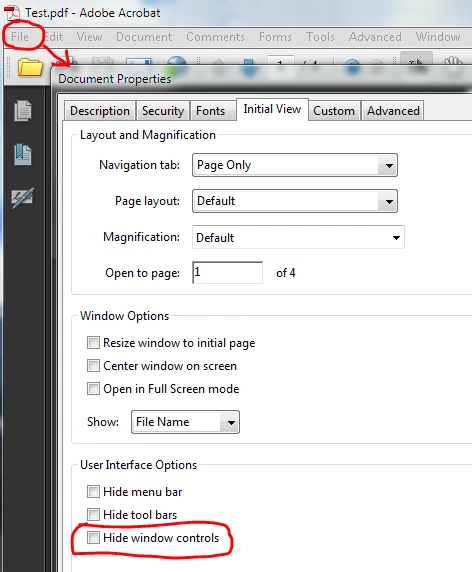
The scroll bars are controlled by the Document Properties dialog in Adobe Acrobat.

Under Initial View, User Interface Options, the Hide window controls option must be unchecked.

Our secretary had selected this option. So this explains why some PDF's had scrollbars, while others did not.

Screenshot:

Capture.PNG

Sincerely,

Rupertsland

Translate
Community Beginner ,
Oct 20, 2023 Oct 20, 2023
LATEST

I've tried all of the suggestions in this thread to no avail. I'm using Pro 2023 and here's what I've tried:

  • Document Properties > Initial View > Interface Options > all are unchecked (Hide menu bars, Hide toolbars, Hide window controls
  • Switching to hand cursor vs. direct selection tool.
  • Preferences > General > Basic Tools > Touch Mode > I tried each option in the dropdown

I've tried closing and reopening the document after each change. In all cases, the scroll bar only appears for a second when I use the scroll wheel on my mouse then it immediately disappears. Any other suggestions?

Translate
Report
Community guidelines
Be kind and respectful, give credit to the original source of content, and search for duplicates before posting. Learn more
community guidelines