
March 28, 2012
Answered

How do I display scroll bar in Reader 9 and X?

  • March 28, 2012
  • 6 replies
  • 201005 views

Hello.

My colleagues and I are having problems getting Reader 9 and X to display scroll bars in PDF's saved in full screen mode.

We can't find any preference or option to force Acrobat to display the scroll bars.

How do I display the scroll bar on the right in Reader 9 and X?

Sincerely,

Rupertsland
This topic has been closed for replies.
Correct answer

Hi Bernd.

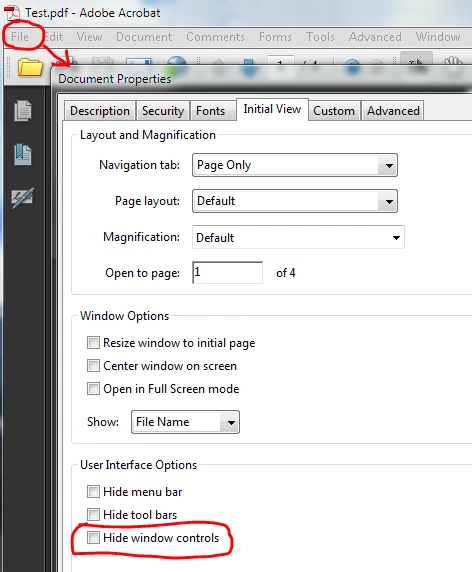
The scroll bars are controlled by the Document Properties dialog in Adobe Acrobat.

Under Initial View, User Interface Options, the Hide window controls option must be unchecked.

Our secretary had selected this option. So this explains why some PDF's had scrollbars, while others did not.

Screenshot:

Sincerely,

Rupertsland

6 replies

Participating Frequently
October 20, 2023

I've tried all of the suggestions in this thread to no avail. I'm using Pro 2023 and here's what I've tried:

  • Document Properties > Initial View > Interface Options > all are unchecked (Hide menu bars, Hide toolbars, Hide window controls
  • Switching to hand cursor vs. direct selection tool.
  • Preferences > General > Basic Tools > Touch Mode > I tried each option in the dropdown

I've tried closing and reopening the document after each change. In all cases, the scroll bar only appears for a second when I use the scroll wheel on my mouse then it immediately disappears. Any other suggestions?

Participant
February 11, 2014

I found out the scoll bar will hide when you on "Toggle Tough Mode". You need to disable that function.

sandmann
Participant
November 22, 2014

Thank you for confirming this. I tried the hand-tool vs. arrow-tool and that worked, but toggling touch mode to "Never" made it so the arrows and scroll bar are ALWAYS visible no matter if the hand or select tool are chosen.

Thank you!! I was going nuts, too!

Participant
October 17, 2013

Hi! I've just signed in to hopefully help someone with this issue.

I must say I went back to the last version of Reader 9 because I was sick and tired when X and its Comment, Share and Tools panels came in (really, I can't stand it).

Go to Edit > Preferences > in Categories: select Documents > in Open Settings: uncheck the 4th box: "Allow documents to hide the menu bar, toolbars and menu controls"

Same window as this:http://i1-win.softpedia-static.com/screenshots/Portable-Adobe-Reader-Lite_4.png

I reopened the document and it worked for me.

Cheers!

Inspiring
January 16, 2014

16. FooChicken said:

"Go to Edit > Preferences > in Categories: select Documents > in Open Settings: uncheck the 4th box: "Allow documents to hide the menu bar, toolbars and menu controls"

Same window as this:

I reopened the document and it worked for me."

That (modified as shown below) worked for me on Adobe Acrobat Pro 11.0.04 on Mac OS X 10.9.1 (Mavericks):

"Acrobat - Preferences - Documents - Allow documents to hide the menu bar, toolbars and menu controls" UNCHECKED.

Then close the document and save configuration when prompted. Open it again and the right vertical scrollbar SHOWS!!!

But there is an extra problem: the up and down arrows do not show on the vertical scrollbar. How to show such arrowheads? Thanks.

Participant
February 4, 2014

thanks a lot mr. Usermac ))) i guess you've just saved my nervous system)

April 26, 2013

>To enable scroll bars in the new Adobe Acrobat X1 all you have to do is disable the TOGGLE TOUCH MODE which will show the vertical scrolling bars on the right side of the screen.

The above suggestion works. Great.

Now, to permanently turn off Touch Mode, allowing scrollbars to always display:

Set Touch Mode preference

You can set how Acrobat enters Touch mode, if at all, for touch enabled-devices.

    Choose Edit > Preferences (Windows) or Acrobat/Adobe Reader > Preferences (Mac OS).

    Under Categories, select General.

    In Basic Tools, choose the desired default setting from the Touch Mode menu.

Participant
April 26, 2013

What part of Adobe "Reader" do you not understand?

This is Adobe Reader forum, not Acrobat.

The same Touch settings are present in Reader but they do not make the scrollbars appear, neither the vertical nor the horizontal one when the view width exceeds the window width. The setting is stupidly embedded in the document and the user has no way to read such files, which seem to be more and more present, or we didn't have this problem in earlier versions, because this moronic behavior is relatively recent, or at least I don't remember anything like that in many years of using PDFs.

What's the point of being able to publish a document if it can't be read properly on any device the user may have? Scrollbars do not belong to the document itself, they should be a base feature of the reader, and appear automatically if the width or length of the document exceeds the size of the Reader window, like every single editor or browser or Windows control does.

April 26, 2013

I am not referring to Acrobat at all. I am referred only to Reader. I just performed the above steps in Reader XI and it worked perfectly. I came here because I couldn't get the scrollbars to display. I did what I told you and they display. In READER, I know what forum this is.

I have a touchscreen PC and the TOGGLE TOUCH MODE button in READER is displayed by default. Toggle it off, and a scrollbar appears. Go into settings as it says and you can turn off TOUCH MODE and the TOUCH MODE button won't appear on the Toolbar anymore. But the scrollbar will be displayed. It works on my system.

You will find the instructions in READER HELP. Just type SCROLLBARS into the Search box for Reader Help and you will see that it works and is listed under READER HELP. Why it said "Acrobat" in the instructions, I don't know.

Correct answer
March 29, 2012

Hi Bernd.

The scroll bars are controlled by the Document Properties dialog in Adobe Acrobat.

Under Initial View, User Interface Options, the Hide window controls option must be unchecked.

Our secretary had selected this option. So this explains why some PDF's had scrollbars, while others did not.

Screenshot:

Sincerely,

Rupertsland

Participant
November 17, 2012

This is ludicrous, users can't control the scroll bars? One of the most important features in navigation? I use Reader X, and almost none of the electronic magazines I read show these scroll bars. They force me to use the mouse wheel to scroll down to the second half of the page displayed every single time, and then it will jump to the next page because I used the wheel one click too far.

Reader is the only PDF reader I know that prevents users from reading. No doubt you devs have multiple 32" LCD monitors on your workstations, but try reading a PDF on a netbook or ultrabook or tablet, it is just impossible.

The reader doesn't even auto-adjust to my screen size to view the page in the largest font, so the scroll bars seem to be only one of the many usability issues of the software.

And I don't miss just the vertical toolbar, but also the horizontal one, when somehow magazines are published 2-page wide and when the 2 pages don't fit on the screen or window. Although I'd much prefer a full screen version that does not just jump from one top of a page to the top of the next page when you click (the mouse cursor looks like a down arrow) but a version that would display the rest of the page that does not fit on the screen so you can read the document.

Scroll bars have nothing to do with document creation, the document scanners don't have the slightest idea on what kind of device the document will be read. It should be possible to enable scroll bars by default on the reader side.

November 17, 2012

Hi Chimel31.

I just read your post this afternoon.

Send feedback to Adobe. If they don't get any complaints from users, then they will do nothing. I feel users should be able to turn on/off scrollbars in Reader. I also do not like the way Read handles the zooming. I have to constantly adjust the zoom. It would have helped to have the scrollbars.

Ruperstland

Bernd Alheit
Community Expert
Community Expert
March 28, 2012

There are no scrollbars in fullscreen mode.

March 28, 2012

Bernd, thanks for your help.

However, once you leave full screen mode and go back to regular mode, the scroll bars still do not display. I tried creating a new PDF using Acrobat 9, and the scroll bars do appear.

Looks like a bug.

Rupertsland,

Canada

Bernd Alheit
Community Expert
Community Expert
March 28, 2012

Some settings in the PDF document can hide window controls. You can check the settings in Adobe Acrobat.