

Answered
How do I stop comment pop ups from opening when I highlight a test?
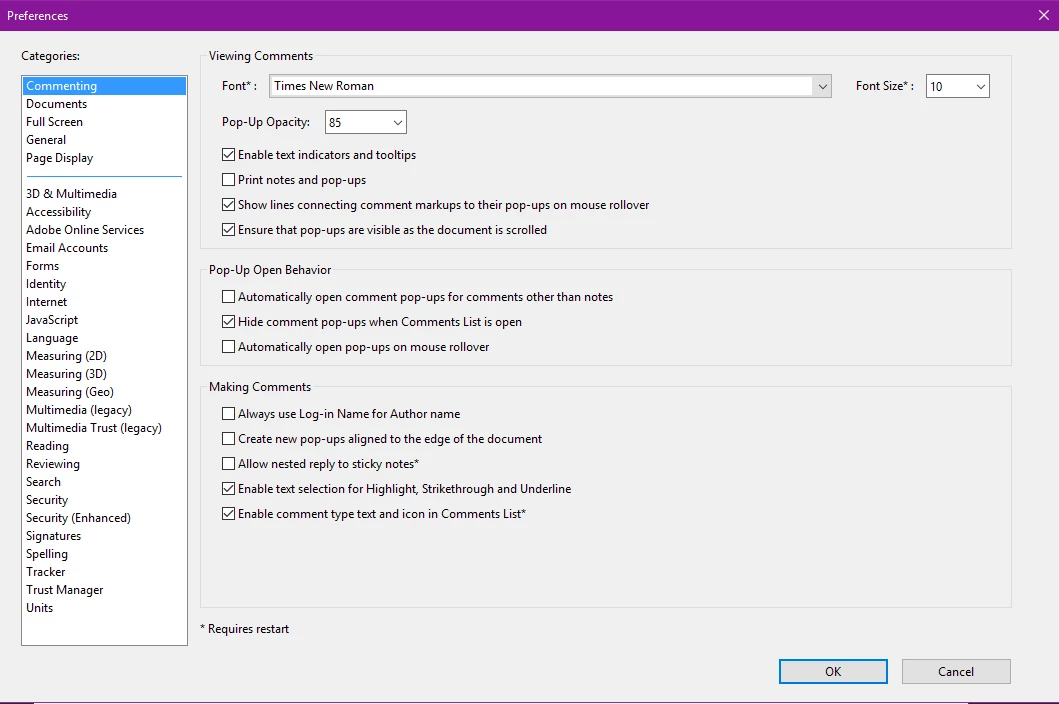
Help. This is really annoying. I need to stop the comment pop-ups from opening whenever I highlight a text. It's rare that I put in comments as is. I've tried everything including changing my preferences like the site says to do and still have the same problem.
This is my preferences pane. It's always been in these settings. And the Automatically open comments pop-ups for comments other than notes has never been selected. It only started happening after the last upgrade. Acrobat had never done this before. I usually had to double click on the highlight to open the pop-up if I wanted to add a comment. Most of the time I just need to highlight so this is really annoying and I need it gone.
 AdChoices