Participant
July 28, 2024
Question

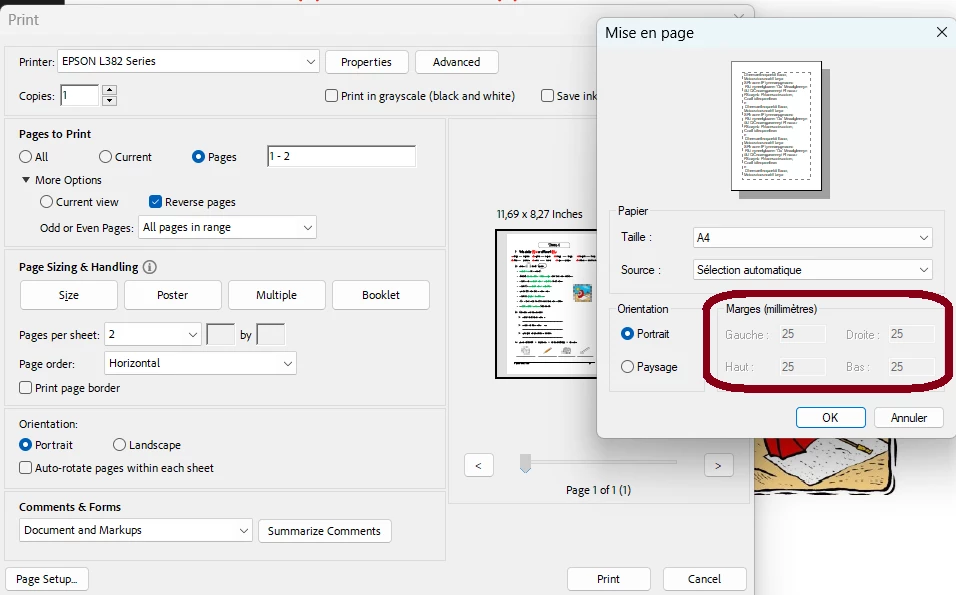
How to adjust page margins before printing in Acrobat DC ?

  • July 28, 2024
  • 2 replies
  • 1646 views

I tried with different types and models of printers but the margins values are greyed-out in the page set up tab.

This topic has been closed for replies.

2 replies

radzmar
Community Expert
Community Expert
August 4, 2024

If you select "actual size" under the Size button, the printout will have full letter size without margings. You the can eventually edit the margins over the indivudual printer driver you can reach by pressing the Properties button. Ink printers sometimes allow a borderless printouts but laser printers don't by design. 

creative explorer
Community Expert
Community Expert
July 29, 2024

@Mahmoud38847483j5ot try this...in Acrobat Pro, click on 'All Tools' and then 'Edit a PDF'. Click on Organize Pages. And then Select 'Set Page Boxes,' to access the margins controls


The easiest setting is to 'Fit to Print' where it would scale the whole document to print appropriately— the printer will scale your PDF down so that it fits inside the paper size. 

I have an Epson printer...so, I set my paper size to A4, 8.26" x 11.69".... click on 'Size' and the 'Fit,' to print is scaled down to 91%...


m