Participant
January 7, 2021
Question

How to disable automatic comment pop up for photos

  • January 7, 2021
  • 2 replies
  • 753 views

Hello,

I tried almost all settings in acrobat reader DC 20.013.20074 version    to disable automatic comments pop-up, it is very problematic especially in presentations  : 
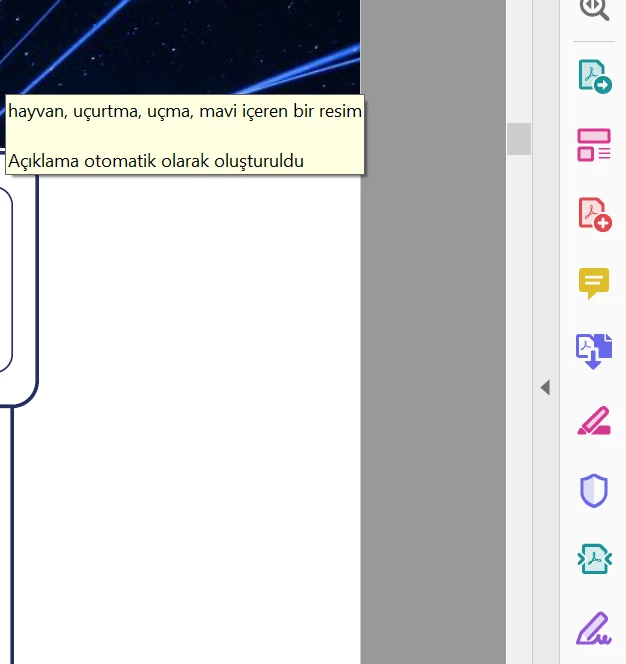


can you help?

 

This topic has been closed for replies.

2 replies

Bernd Alheit
Community Expert
Community Expert
January 8, 2021

How have you created the PDF file?

burak5F97Author
Participant
January 8, 2021

Yes, i transformed it from PPTX

Bernd Alheit
Community Expert
Community Expert
January 8, 2021

Play with the options when you export the file from Powerpoint.

AkanchhaS8194121
Legend
January 7, 2021

Hey!

thanks for the screenshot. Do you get this pop-up when scrolling upon the page? You may check the following Commenting preferences-

  • Navigate to Acrobat>Edit>Preferences>Pop-Up Behavior-
  • Uncheck these two 1st and 3rd if its already checked.


  • OK>Close and re-open Reader DC to apply the changes. 


Thanks,

Akanchha 

burak5F97Author
Participant
January 8, 2021

Yes , they are already unchecked  ( In Turkish please see below ) 


It happens when static page view, and also full-screen mode, and also normal page mode not in scroll down.

It says something about the photo  itself and after " comments created automatically" 

I first thought it was about accessibility settings, but it does not seem so.

It is very frustrating.