
Inspiring
April 24, 2015
Answered

I can not use the Acrobat DC Cloud. How do I get an Acrobat PDF Reader that does not use the Cloud?

  • April 24, 2015
  • 4 replies
  • 19377 views

The subject pretty much says it all.

I can not save sensitive corporate files on your Cloud.

Even for non-sensitive PDFs, I do not always have access to the cloud when I need to view or work with a PDF.

I need a non-cloud version of Acrobat Reader.

When Reader DC installed onto my system it must have blown away Reader XI.

After I uninstalled Reader DC, now I can't open/read PDFs anymore.

Also, I can't find a copy of Adobe Acrobat to install that isn't cloud dependent.

This is a problem for me.

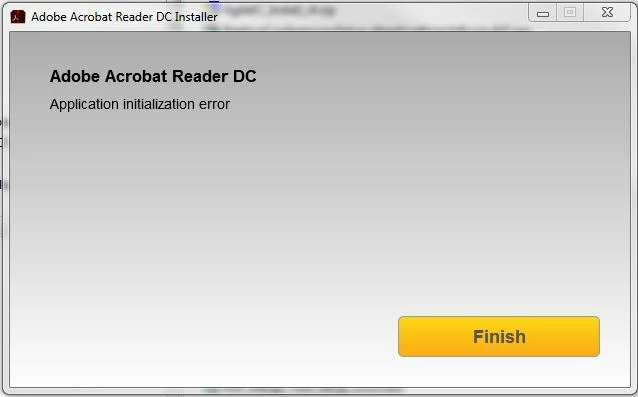
Besides all that, NOW I get error messages every time I try to re-install Reader DC.

See below.

So, today at work, I can no longer open PDFs.

Thanks? NOT!

HELP!

Gene
    This topic has been closed for replies.
    Correct answer Climer97007

    Graffiti, I was really hoping that would work.

    Same error message.

    Acrobat Reader won't install no matter what I do.

    Help! I've got work to do!


    Here, I finally have a solution.

    Gotta love Google.

    More helpful than Adobe so far.

    Note: Clicking on the link below will immediately open the download dialogue box.

    ftp://ftp.adobe.com/pub/adobe/reader/win/10.x/10.1.1/en_US/AdbeRdr1011_en_US.exe

    I used this download to install, and the Installer was flawless.

    Thanks everyone who contributed ideas and potential solutions.

    4 replies

    thegeneticbytemare
    Participant
    September 15, 2018

    I posted a response to this today in this thread https://forums.adobe.com/thread/2298262

    It contains detailed instructions to finding the installer for Adobe Reader v11.0.10, the update to v11.0.23 as well as all language versions released under v11.0.00 on Adobe's ftp server.  Hope this helps.  Thanks Climer97007​ for getting me started on this little project.  SORRY IT TOOK 3 YEARS!

    melissac80870568
    Participant
    January 2, 2016

    Thank you thank you!!!! I do a lot of work where I open temporary files and do not by any means wish to save them like I have to on the cloud. You made my day:)

    try67
    Community Expert
    Community Expert
    January 3, 2016

    FYI: When using DC one is not required to save anything to the cloud.

    Bernd Alheit
    Community Expert
    Community Expert
    April 24, 2015

    ‌You can use Acrobat Reader DC without the cloud.

    Inspiring
    April 24, 2015

    Maybe Reader DC would work without the cloud?

    However, that did not appear to me be an option, so I chose to uninstall it.

    BIG mistake.

    Doing that has corrupted the Acrobat XI which has now also been uninstalled.

    If I could only get either one of them to re-install, I'd be a happy camper.

    So frustrating.

    I just need a PDF Reader that installs, and works, and works without pushing files to the cloud. Simple.

    Anyone know a good third party PDF viewer software?

    I need a PDF Viewer NOW that works.

    I am tired of running in circles trying to get Acrobat's broken installer to work.

    Gene

    ~graffiti
    Legend
    April 24, 2015

    I would use this Download Adobe Reader and Acrobat Cleaner Tool - Adobe Labs and completely get rid of all traces of Reader. Then I would download the full installer (for whichever version you want) at Adobe - Adobe Acrobat Reader Distribution and try again.

    ~graffiti
    Legend
    April 24, 2015

    You can get it at Adobe Acrobat Reader DC Install for all versions

    Go there, choose your OS and language then choose Reader XI.

    Inspiring
    April 24, 2015

    Again, it will not install.
    I get the same ERROR message posted above.

    Also, the Reader DC version will not install without the SAME ERROR Message.

    It seems once I uninstalled the DC version, that the previous XI version was corrupted.

    Now, none of these will install without the above, VERY helpful, ERROR MESSAGE.

    Really getting frustrated here.