
zhongxiangy9438305
Participant
February 7, 2017
Question

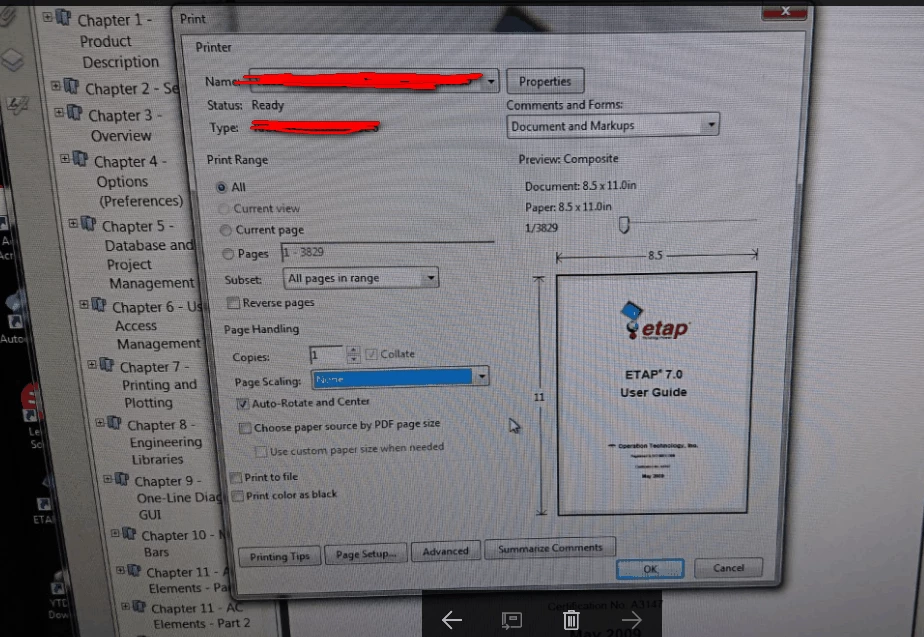
I don't see "print on both sides of paper" option in my Acrobat printer.

  • February 7, 2017
  • 3 replies
  • 838 views

Hello everyone:

         I have a question.I don't see  "print on both sides of paper" option in my  Acrobat  printer.You can see this problem in blow.I don't know how  to fix this problem.My OS is Windows 7  64 bit, and my Acrobat edition is Adobe Acrobat X Pro.Is anyone know how to fix it?Thank you.
    This topic has been closed for replies.

    3 replies

    Legend
    February 7, 2017

    Please check and compare versions. Exact versions.

    Legend
    February 7, 2017

    You have an older version I think. In your old version, if the option exists, it will be in Properties. Or you could update your software. Compare versions.

    zhongxiangy9438305
    Participant
    February 7, 2017

    Hi! Test Screen Name, thanks for your reply! Our company only has one version and I re-install use the same version. So I don't think that is software version problem.

    Legend
    February 7, 2017

    You would not see it on this screen. Click Properties.

    zhongxiangy9438305
    Participant
    February 7, 2017

    Hi! Test Screen Name, actually I checked Properties, but there  didn't have it. My co-workers also use Adobe Acrobat X Pro, but their software screen is OK. As you can see, there has an option "Print on both sides of paper". That's different mine, only my software doesn't have it.