Participant
August 13, 2020
Answered

I keep getting a nag screen "Reopen Closed PDF's"... Reopen Closed PDFs

  • August 13, 2020
  • 2 replies
  • 2030 views

...when I have 2+ documents open. I have seached the forum and found only incorrect answers. It's blue, in the upper right corner. Research on the forums DC, Acrobat, Reader, etc., indicates this has been happening for a long time, well over a year.

__________________________________________________________________________
______________________________How do I stop this?____________________________

__________________________________________________________________________

An incorrect one claims to be correct, posted by:

 Correct answer by MeenakshiNegi | Adobe Employee


https://community.adobe.com/t5/acrobat/asking-how-to-stop-the-quot-reopen-closed-pdfs-quot-message-from-appearing/m-p/11358195?page=3#M270772


After following the instructions (multiple times), I tried saving, close/open, and reboot. Nothing works.
This topic has been closed for replies.
Correct answer Demba93

Hi @Tony0D45 ,
Based on reply from user @DevilDoc325 from this Topic https://community.adobe.com/t5/user/viewprofilepage/user-id/9647229 
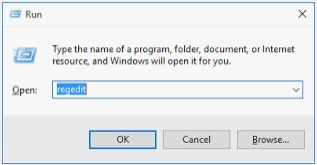
1) Close Acrobat Reader and then Open regedit in Run command.

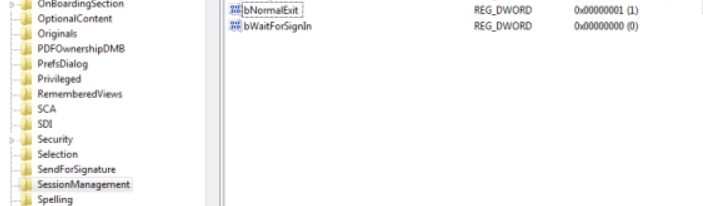
2) Go to path : HKEY_CURRENT_USER\Software\Adobe\Acrobat Reader\DC\SessionManagement
3) Set bNormalExit on value 1

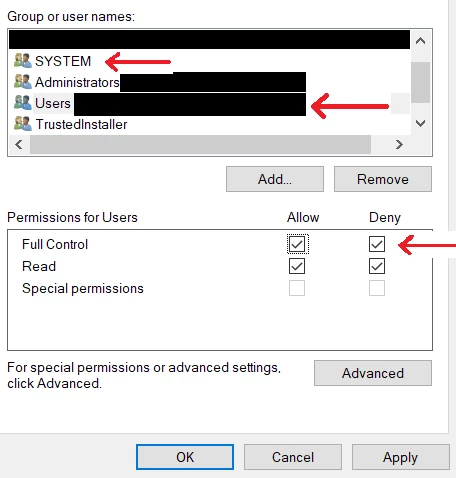
4) Click right mouse button on SessionManagement go to Permissions or Security (I have different system language)
5) Deny full acces to your user and System (If you do it for the first time it may be appear a message something like "do you know what you're doing?". Click yes or ok, because this action is reversible, if this will not be working in your case.


This Blue box "Reopen Closed PDF's" appear on average until 10-15 PDF docs restarts.

If you will delete SessionManagement (according to @Ayush__Jain ) on next restart Adobe Reader this key(SessionManagement) will be create one more time, so this is pointless.

Privately, in my opinion, the fact that the company has not been able to fix the error for 5 years by adding a button in the preferences is slightly funny, but that is only my opinion.

I will test this solution on over 2000 pdf's, but if this solution (based on @DevilDoc325 answer, of course) will work in your case too please add answer on post that you mentioned, for future answer seekers who may not find it here

2 replies

Demba93Correct answer
Participant
January 14, 2024

Hi @Tony0D45 ,
Based on reply from user @DevilDoc325 from this Topic https://community.adobe.com/t5/user/viewprofilepage/user-id/9647229 
1) Close Acrobat Reader and then Open regedit in Run command.

2) Go to path : HKEY_CURRENT_USER\Software\Adobe\Acrobat Reader\DC\SessionManagement
3) Set bNormalExit on value 1

4) Click right mouse button on SessionManagement go to Permissions or Security (I have different system language)
5) Deny full acces to your user and System (If you do it for the first time it may be appear a message something like "do you know what you're doing?". Click yes or ok, because this action is reversible, if this will not be working in your case.


This Blue box "Reopen Closed PDF's" appear on average until 10-15 PDF docs restarts.

If you will delete SessionManagement (according to @Ayush__Jain ) on next restart Adobe Reader this key(SessionManagement) will be create one more time, so this is pointless.

Privately, in my opinion, the fact that the company has not been able to fix the error for 5 years by adding a button in the preferences is slightly funny, but that is only my opinion.

I will test this solution on over 2000 pdf's, but if this solution (based on @DevilDoc325 answer, of course) will work in your case too please add answer on post that you mentioned, for future answer seekers who may not find it here

Ayush__Jain
Adobe Employee
Adobe Employee
August 14, 2020

Hi,


Could you please let me know how are you Closing the Application in your last session?

Is it by the "Close" icon in the Acrobat window or you are killing the Acrobat Process through Task Manager / Batch execution?

In case of normal Closing the application(using the Close Icon), that message should not come on next launch.


However, if this still happens for you during normal exit, I would request you to do this once :

Could you please try by doing the below steps and share your findings with us:

1) Close Adobe Acrobat Reader DC.

2) Open Run -> Regedit.exe (Registry Editor)

3) Navigate to path : HKEY_CURRENT_USER\Software\Adobe\Acrobat Acrobat\DC\SessionManagement

4) Right Click on the "SessionManagement" key and Delete it

5) Relaunch Acrobat and observe Try for all further sessions of Reader and let me know if deleting this key works for you and that the message should not come?


Thanks

Ayush Jain

Ayush__Jain
Adobe Employee
Adobe Employee
August 14, 2020

If you would like to reopen your PDFs from last session automatically , you can do it as Open Preferences -> General -> select the preference "Open PDFs from last session on Acrobat launch".


This will ensure that you will not get the blue dialog for "Reopen Closed tabs" again.


Let me know if that helps ?


Thanks

Ayush Jain