New Participant
April 23, 2015
Answered

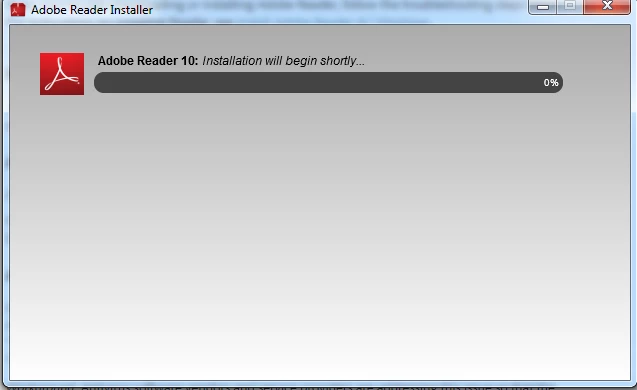
Installation will being shortly

  • April 23, 2015
  • 4 replies
  • 33162 views

Hi I don't know why but whenever I try install acrobat reader it says, "installation will begin shortly" please help 😧 I've waited for like the last 30 minutes and I don't know why it wont download.

    This topic has been closed for replies.
    Correct answer jefferydodds

    ‌Try this, it worked for me.

    After you've waited for a minute or so, cancel the install.

    You should be prompted to try again.  Go ahead and try again.

    Mark Google settings to whatever you prefer.

    You should then get a prompt to close your open browser, do this.

    It should then install properly.

    Good luck

    4 replies

    New Participant
    June 15, 2020

    I had this issue in my laptop. To resolve the issue , Right Click the downloaded file > select Run as Administrator . Boom it works like a charm.

    jefferydoddsCorrect answer
    New Participant
    July 29, 2015

    ‌Try this, it worked for me.

    After you've waited for a minute or so, cancel the install.

    You should be prompted to try again.  Go ahead and try again.

    Mark Google settings to whatever you prefer.

    You should then get a prompt to close your open browser, do this.

    It should then install properly.

    Good luck

    forums_
    New Participant
    June 1, 2018

    it doesnt work for me though....

      wrote

    Try this, it worked for me.

    After you've waited for a minute or so, cancel the install.

    You should be prompted to try again.  Go ahead and try again.

    Mark Google settings to whatever you prefer.

    You should then get a prompt to close your open browser, do this.

    It should then install properly.

    Good luck

    pwillener
    Braniac
    April 24, 2015

    Try using the offline installer from http://get.adobe.com/reader/enterprise/

    New Participant
    April 24, 2015

    The link doesn't work sorry :L

    pwillener
    Braniac
    April 24, 2015

    Jason Wu wrote:

    The link doesn't work

    What exactly does that mean:

    1. you get a 404 ?
    2. you cannot download anything from this link ?
    3. the download produces the same error message ?

    If you could download, what is the name of the downloaded installer?

    AadeshSingh
    Community Manager
    Community Manager
    April 23, 2015

    Hi Jason,

    I am sorry for the inconvenience caused. Please use this link to download Adobe PDF Reader 10 : Adobe Acrobat Reader DC Install for all versions‌ 

    In Step 3 you will get the option to choose the version of Adobe reader to download. Make the selection & proceed with the prompts to download & install it.

    *Note : Please check the system requirements before downloading.

    In case if you experience any issue please let us know. We will be happy to help you.

    Regards,

    Aadesh

    New Participant
    April 24, 2015

    Hey Aadeshs,

    I have tried that already however it's still doing the same, my computer meet the requirements.