
Participating Frequently
February 10, 2021
Answered

Internet links cannot be opened

  • February 10, 2021
  • 5 replies
  • 1727 views
Hello everyone, 
as soon as you want to open a link in a PDF file, the following error message appears:
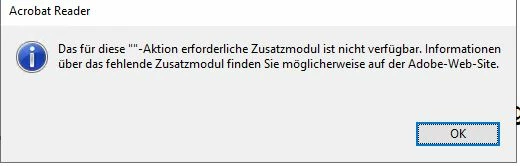
We have installed the current release, this also applies to the Pro version of Adobe Acrobat. Do you have any idea why that could be?

best regards
Jan

 
This topic has been closed for replies.
Correct answer Bernd Alheit

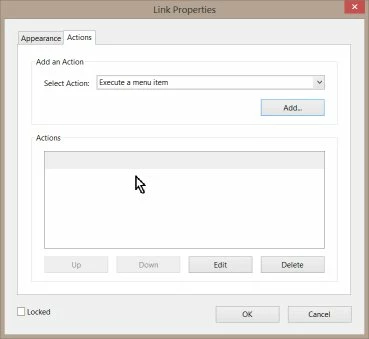
The links doesn't have any action:


5 replies

Bernd Alheit
Community Expert
Community Expert
February 25, 2021

Can you share a sample file?

IT5E7BAuthor
Participating Frequently
February 26, 2021

Here are the file.

Bernd Alheit
Community Expert
Bernd AlheitCommunity ExpertCorrect answer
Community Expert
February 26, 2021

The links doesn't have any action:


Bernd Alheit
Community Expert
Community Expert
February 23, 2021

Does this happens also with links in other PDF files?

IT5E7BAuthor
Participating Frequently
February 24, 2021

Hi,

we tried different files, the error appears with every file.


Greats

Meenakshi Negi
Legend
February 15, 2021

Hi there,


We have released an update for Acrobat and Reader DC(version 21.001.20138) that contains the fix. 

Please update the application to the latest version. In the application, go to Help > Check for updates.


For more information about the latest version, please refer to this link: https://www.adobe.com/devnet-docs/acrobatetk/tools/ReleaseNotesDC/continuous/dccontinuousfeb2021qfe.html#dccontinuousfebtwentytwentyoneqfe  


Let us know how it goes.


Thanks,

Meenakshi

IT5E7BAuthor
Participating Frequently
February 23, 2021

Good Morning,


we installed the update and restarted the Computer, ther Error is still there.


Greats

Jan

Adobe Employee
February 11, 2021

Hi, Sorry for the inconvinience caused at your end. If after following the steps as mentioned by amal you are still seeing the issue at your end , if possible can you please share the PDF files in which you are experiencing the issue at your end so that we can triage the issue at our end. 

you can share the files directly at :[ personal information removed by the moderator]


Amal.
Community Manager
Community Manager
February 10, 2021

Hi there


Hope you are doing well and sorry for the trouble. As described after updating the application to the new version you started getting the error message about missing Adobe Plug in as shown above and the links are not opening in PDF.


Please try to reboot the computer once and see if that helps.


If it doesn't work, please try to repair the installation (Windows Only) and check . Go to Help > Repair installation and reboot the computer once.


You may also look at the correct answer marked in a similar discussion https://community.adobe.com/t5/acrobat-reader/error-message-quot-the-acrobat-pdf-browser-plug-in-is-missing-quot/m-p/9199483 and see if that works for you.


Regards

Amal