
Participant
March 2, 2021
Question

Invalid node in PDF document

  • March 2, 2021
  • 2 replies
  • 8338 views

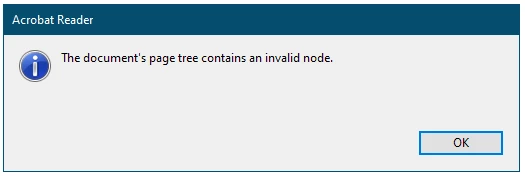
I have a Perl program which generates some PDF files. When these files are opened by Adobe Acrobat Reader DC in Windows 10 there is an error message 'The document page tree contains an invalid node'. Apart from the message the pages appear to render correctly.


Other pdf readers don't produce the error message.

How can I obtain more information about the invalid node? With this information it might be possible fix my program so that it produces error free PDF files.

This topic has been closed for replies.

2 replies

Adobe Employee
March 9, 2021

Hi,

Thanks for reaching out to us. We are sorry for the inconvenience.

Request you to kindly share the sample PDF file and acrobat version you are using.

You can find the version using the steps mentioned below:
Go to Help -> About Adobe Acrobat Reader DC.


Thanks,

Sweta Karn

Participant
March 10, 2021

I'm using Acrobat Reader DC 21.001.20142.30912.

I don't seem to be able to upload PDF files here but You can access my sample files at https://drive.google.com/drive/folders/1wqyw9bx_KJczFL4z2H70_Sq8obh1qeWY?usp=sharing 

The files sample1.pdf and sample2.pdf were generated from the first two pages of sample,pdf using a Perl program.


Acrobat reader can open both sample.pdf and sample1.pdf without any problem but produces the error message 'The document page tree contains an invalid node' for sample2.pdf. Experience with splitting longer multipage documents shows that the error message appears for all pages except the first. All the pages do however appear to render correctly.


I appreciate that Acrobat reader may well be correctly reporting a non critical error but I am hoping that it might be possible to identify what error was introduced by the Perl program in the hope that we might then be able to modify it to produce error free documents.


Bernd Alheit
Community Expert
Community Expert
March 10, 2021

I see that the xref tables of sample1 and sample2 are not correct.

try67
Community Expert
Community Expert
March 2, 2021

You will not get more info than that from Reader. You will need to use a PDF debugging tool to find out more.