Exit
  • Global community
    • Language:
      • Deutsch
      • English
      • Español
      • Français
      • Português
  • 日本語コミュニティ
  • 한국 커뮤니티
0

Link to SWF file does not work in Acrobat Reader

New Here ,
Dec 06, 2017 Dec 06, 2017

In a PDF presentation I have a link to a MOV file and a link to a SWF file.  On a Windows PC (various versions) the link to the MOV file works, bringing up a dialog box to warn me that Windows Media Player will be opened.  But when I click on the link to the SWF file I get an error message saying "This file is set to be launched by this PDF file. This is currently disallowed by your system administrator."

In Acrobat Pro both links work fine (with dialog boxes warning that an external application is being opened).

Why is Acrobat Reader blocking Adobe Flash Player from launching?

We tried turning off Protected Mode under Security Preferences but it didn't help.

1.4K
Translate
Report
Community guidelines
Be kind and respectful, give credit to the original source of content, and search for duplicates before posting. Learn more
community guidelines
Adobe Employee ,
Feb 02, 2018 Feb 02, 2018
LATEST

Hi Regisull,

We apologize for the delay in response to your query.

As shared above, that only Adobe Reader doesn't allow to access the SWF links of a pdf file. However, both MOV and SWF works fine for the Acrobat DC.

In this scenario we recommend you to check the following preferences settings of Adobe Reader DC application and see if that helps.

Launch Adobe Acrobat Reader DC> Edit> Preferences (Ctrl+K)> Multimedia Trust (legacy)
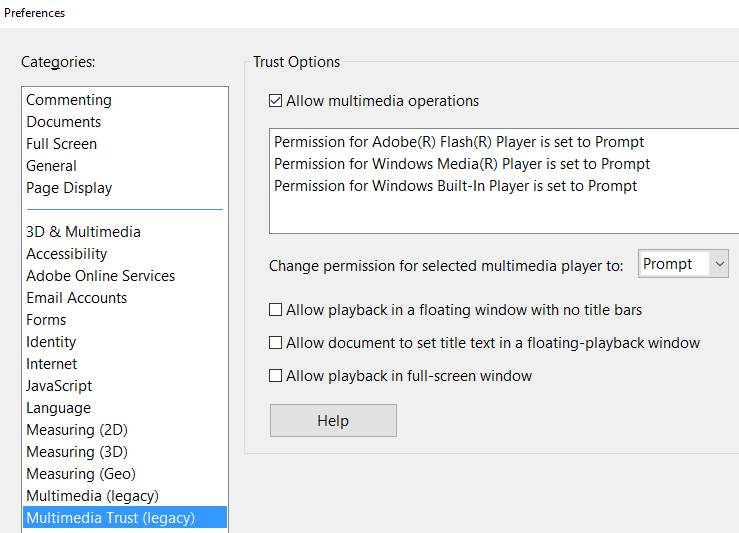
Check options given above, apply the changes and see.

Let us know if that makes any changes.

Regards,

Akanchha

Translate
Report
Community guidelines
Be kind and respectful, give credit to the original source of content, and search for duplicates before posting. Learn more
community guidelines
