Participant
March 19, 2024
Question

Lockable Preferences not working

  • March 19, 2024
  • 1 reply
  • 4644 views

Lockable Preferences not working with new Reader Version 24.1.20604.0.


https://www.adobe.com/devnet-docs/acrobatetk/tools/PrefRef/Windows/FeatureLockDown.html#idkeyname_1_9921

https://www.adobe.com/devnet-docs/acrobatetk/tools/PrefRef/Windows/FeatureLockDown.html#idkeyname_1_11881


Settings 

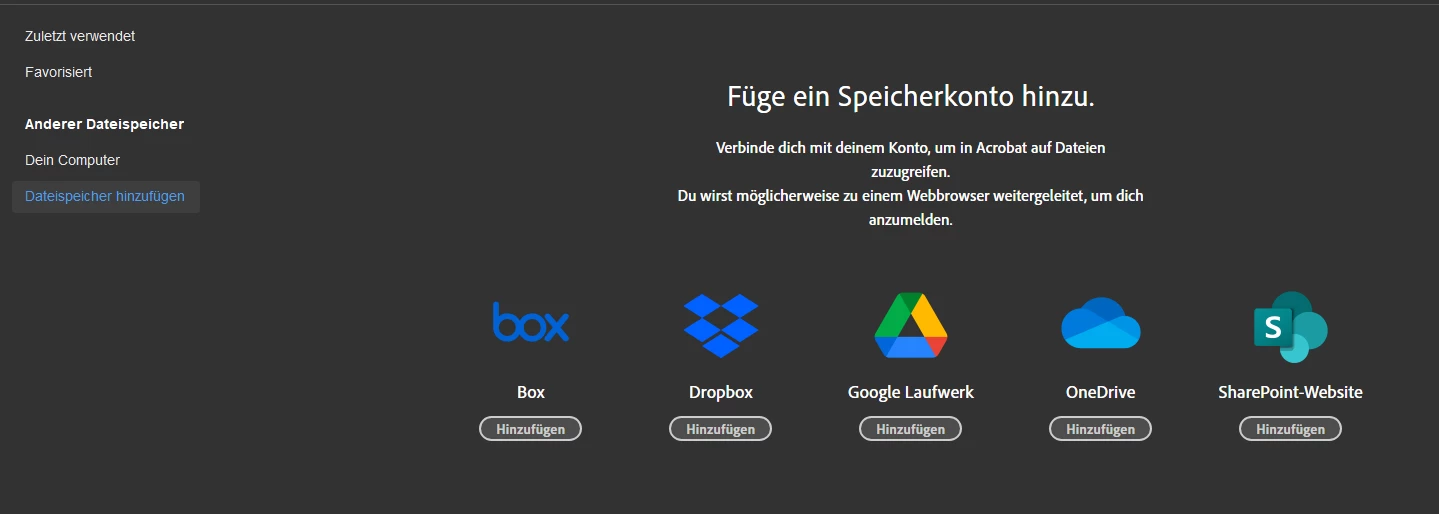
bToggleWebConnectors and bAcroSuppressUpsell are set for 32 and 64-Bit and there are still multiple upsell windows and it´s still possible to add cloud storage.


Example Export of a Client with 64-Bit Version:


Windows Registry Editor Version 5.00

[HKEY_LOCAL_MACHINE\SOFTWARE\WOW6432Node\Policies\Adobe\Acrobat Reader\DC\FeatureLockdown]
"bPurchaseAcro"=dword:00000000
"bAcroSuppressUpsell"=dword:00000001
"bUpdater"=dword:00000000
"bUsageMeasurement"=dword:00000000
"bToggleSophiaWebInfra"=dword:00000000

[HKEY_LOCAL_MACHINE\SOFTWARE\WOW6432Node\Policies\Adobe\Acrobat Reader\DC\FeatureLockdown\cIPM]
"bShowMsgAtLaunch"=dword:00000000
"bDontShowMsgWhenViewingDoc"=dword:00000000

[HKEY_LOCAL_MACHINE\SOFTWARE\WOW6432Node\Policies\Adobe\Acrobat Reader\DC\FeatureLockdown\cServices]
"bToggleWebConnectors"=dword:00000001



This topic has been closed for replies.

1 reply

Participating Frequently
April 23, 2024

Same problem here. Have you find workaround ?

Amal.
Community Manager
Community Manager
April 23, 2024

Hi there


Hope you are doing well and thanks for reaching out.


What happens when you try to apply the lockable settings? Do you get any error message? If yes, please share the screenshot of the same.


What is the worksflow/steps you are doing? A small video recording of the same would be very helpful for more clarity.


~Amal

Amal.
Community Manager
Community Manager
November 25, 2024

Hi Adobe, I am on Reader 2024.003.20112 64 Bit and none of theknown

registry keys or GPOs are working in order to lock down the Reader. We have to lock down all internet features and more of this product - how to acomplish that?


Hi there


If it is a 64-bit Win machine, please follow this registry path "Computer\HKEY_LOCAL_MACHINE\SOFTWARE\Policies\Adobe\AdobeAcrobat\DC\FeatureLockDown" and see if that works.


~Amal