Question
Mac Bookmarks
How to display bookmarks after opening a document on Mac? (macOS Sierra 10.12.4 Adobe Acrobat Reader DC 2017 009.20004)
When I choose View>Show/Hide.Navigation Panes there is no option for Bookmarks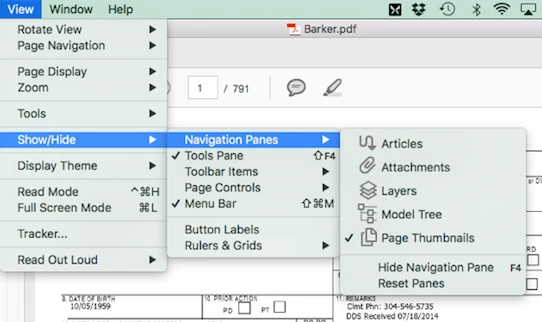

How to display bookmarks after opening a document on Mac? (macOS Sierra 10.12.4 Adobe Acrobat Reader DC 2017 009.20004)
When I choose View>Show/Hide.Navigation Panes there is no option for Bookmarks
Already have an account? Login
Enter your E-mail address. We'll send you an e-mail with instructions to reset your password.
 AdChoices