
Participant
August 13, 2010
Question

missing msvcp100.dll error message

  • August 13, 2010
  • 5 replies
  • 38851 views

the adobe reader always starts with a system error message about a missing "msvcp100.dll" file (needed for acroRd32.exe). I have to click the OK-Button and the reader starts in a normal way.
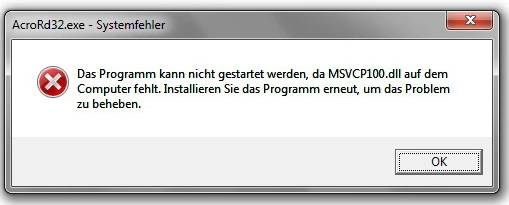
I already tried to repair the installation, but it didn't help. I use Adobe Reader version 9.3.3 with windows 7 professional.

Does anybody know how to solve this annoying problem?

thank you

mrbenanzo

    This topic has been closed for replies.

    5 replies

    October 16, 2014

    Hi,

    I too faced this issue but fortunately I found a post that helped me to resolve this error. It is very disappointing situation for any user when they get error message on screen. The situation become worst when you encounter DLL error so here I am sharing link that help me to resolve the issue. 

    Windows 7 itunes error msvcr80.dll missing - Fix PC Errors

    September 16, 2014

    In order to fix the issue you may install the latest Microsoft Visual C++ 2010 Redistributable Package and check if it helps.

    You may install the latest Microsoft Visual C++ 2010 Redistributable Package according to the Windows 7 versions you are using.

    For 32bit: Microsoft Visual C++ 2010 Redistributable Package (x86)

    For 64bit: Microsoft Visual C++ 2010 Redistributable Package (x64)

    Participating Frequently
    June 30, 2014

    I fixed my issue with 110 by performing the following actions:

    [link removed - dll download discouraged]

    Participant
    January 26, 2012

    Hello,
    I also faced this missing file error,  i got  alot of information about this error from this discussion. I will share my ideas with you that how i fixed this problem

    1. Reinstall the Associated Program
    2. Reinstall Microsoft Visual C++ 2010 Redistributable Package (x64)
    3. Repair Corrupted Registry Hives
    4. Scan and Repair the System Files
    5. Restore the System to an Earlier Date

    The one most recommended thing is to use a Registry Cleaner program to fix MSVCP100.dll error.
    If you have already been experiencing the MSVCP100 Dll Error then read this article MSVCP100.Dll Error Fix


    Hope it solves your problem.

    pwillener
    Legend
    August 15, 2010

    I don't know if the VC++ 2010 runtime is part of Windows 7, and if so, why it is missing.

    The first thing I would try to install it from http://www.microsoft.com/downloads/details.aspx?FamilyID=a7b7a05e-6de6-4d3a-a423-37bf0912db84 (you may need to change the language to correspond to your OS).