


ashleyn34947949
Participant
October 2, 2018
Answered

No signature block available

  • October 2, 2018
  • 2 replies
  • 1115 views

Hi,

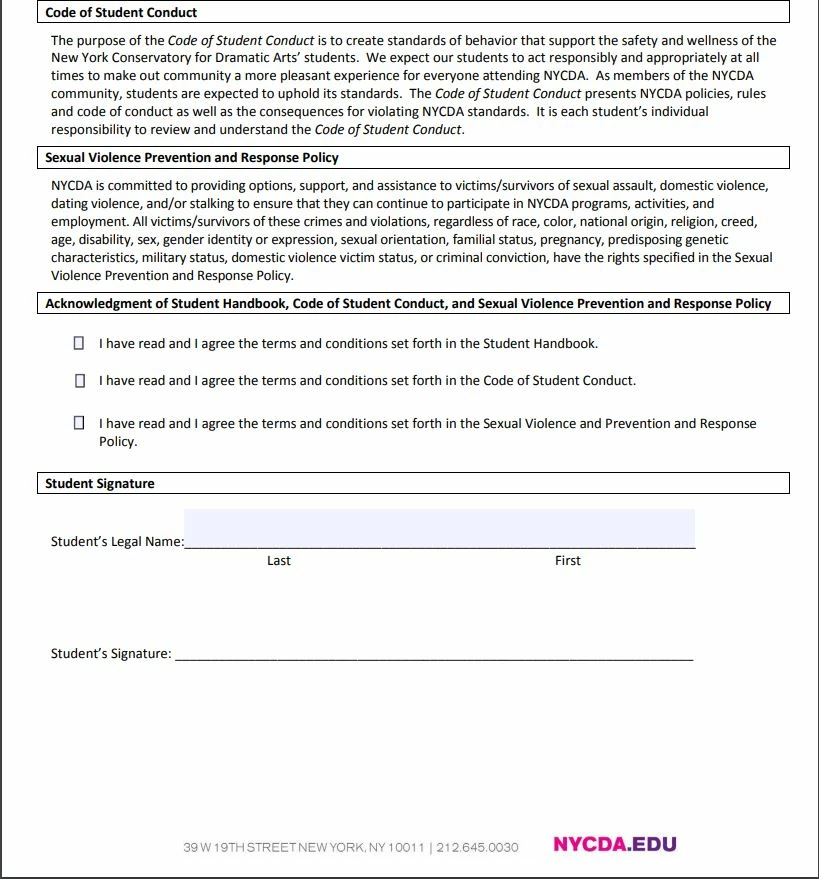
I created our enrollment documents in a PDF for students to fill and sign and send back to the school I work for.  I've had a couple of the student come back to me saying they are unable to edit or add a signature.  The student took a screenshot and sent it over to show what it looked like on her computer, I have attached the picture below.  The picture shows the box isn't there at all, but the other fillable fields are.  I tested the file on a couple of the other computers in the office and it was there and could be edited.  I'm not sure what is happening and everything I have googled or searched in the forums do not have anything to do with this specific issue.  I'm look for the solution to give to the student so they will be able to complete the forms.  Thank you for your time!

Ashley
    This topic has been closed for replies.
    Correct answer sangrover

    Hi,

    Thanks for reporting the issue. In order to reproduce the issue can you please provide the following details :

    1. Version of Reader. Go to Help --> Check for Updates.

    2. OS Version : Win or MAC ?

    3. Did the students try adding a signature using the Fill and Sign app? If not what steps did they follow.

    4. Can you share a sample PDF file with us? You can mail it to sagrover@adobe.com .

    5. It will be great if you could share a video reproducing the issue.

    Please let me know for any concerns.

    Thanks and Regards,
    Sandeep Grover

    2 replies

    sangroverCorrect answer
    Adobe Employee
    October 3, 2018

    Hi,

    Thanks for reporting the issue. In order to reproduce the issue can you please provide the following details :

    1. Version of Reader. Go to Help --> Check for Updates.

    2. OS Version : Win or MAC ?

    3. Did the students try adding a signature using the Fill and Sign app? If not what steps did they follow.

    4. Can you share a sample PDF file with us? You can mail it to sagrover@adobe.com .

    5. It will be great if you could share a video reproducing the issue.

    Please let me know for any concerns.

    Thanks and Regards,
    Sandeep Grover

    ashleyn34947949
    Participant
    October 3, 2018

    Hi!

    The student ended up needing to update the Reader (I guess because my Pro is newer) and then she was able to click into fill & sign button to place the signature.  She was doing it on Windows.  Thank you for your time and information regarding this.  It was such a simple fix

    Kind Regards,

    Ashley

    Adobe Employee
    October 4, 2018

    Hi ashleyn34947949,

    I am glad i could help you out !! It will be really helpful if you can mark the answer as correct so that other users don't face the same issue.

    Regards,
    Sandeep Grover

    Bernd Alheit
    Community Expert
    Community Expert
    October 3, 2018

    What app did they use?