
Copy link to clipboard
Copied
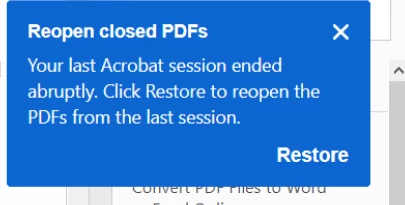
Does anyone know how to disable this notification that appears every time I open a pdf in adobe reader. Clicking restore doesn't even do anything so I'm not sure if it
even works.
Copy link to clipboard
Copied
Hi Rob,
The dialog box shown above comes up, when a document was closed abruptly. In past, users used to complaint about the lose of data either due to system shutdown or Adobe Reader closed automatically or crashed because of some technical glitch.
This feature "Reopen PDFs from last session" have been introduced in the latest release May-2019. Its a design behavior now, and it can't be disabled.
What's new in Adobe Acrobat DC
Clicking restore doesn't even do anything so I'm not sure if it even works.
This should definitely work, and to test you can make a slight change in the file and close without saving. Check if you get it back after restoring.
Hope this answers your query.
Thanks,
Akanchha
Copy link to clipboard
Copied
While you say it comes up when not shutdown correctly, this message box comes up each and every time Adobe is opened even after successful shutdown of either document or site.
Copy link to clipboard
Copied
Copy link to clipboard
Copied
I'm having the same issue, this pop-up occurs every time I open and close a pdf. Clicking restore does nothing
Copy link to clipboard
Copied
Get ready! An upgraded Adobe Community experience is coming in January.
Learn more