



Copy link to clipboard
Copied
pdf displays correctly but when printed, the print is reduced. this issue just started.


 1 Correct answer

Are you trying to print from the browser? If so, can you right-click on the link to the form and save it locally to print directly from Adobe Reader DC?

 9
Replies
9
9
Replies
9


Copy link to clipboard
Copied
Hi Rickg50678788,
Please try the repair installation of the application and then try printing.
Also, refer to the steps below and see if it helps:
Troubleshoot PDF printing in Acrobat and Reader
Let me know if the issue still persists.
Thanks,
Supriya
Copy link to clipboard
Copied
Supriya
I printed out the document you sent to me. I will not be home for a few days to work on this issue. Before I start looking at printer drivers I have a few items that confuse me.
The pdf I am looking at thru adobe dc is a form I have viewed and printed (normally) many times before. The document has not been changed in 2 years. The view is normal. when I select the printer icon that is when I get a reduced version of the form. This has never happened before. I have some pdf's on my local pc that still view and print normally. Any other documents (excell sheets, m/s word docs, etc) print fine. If this is the case can it be a printer driver issue.
I am running windows 7 on my pc. Adobe Acrobat DC is ver 15.023.20056. I use mozilla firefox for the browser, which I have used forever. Can there be an issue is Adobe DC. Does it have anything to with printing.
Any assistance you can provide is appreciated.
Thanks
Rick
Copy link to clipboard
Copied
Rick,
When you go to the print dialog is the Actual Size radio button selected? You may also want to click on the proper Orientation (These screen shots are from my Mac, but it should be similar on Windows).

Can you click Page Setup and be sure you have the proper Paper Size selected?

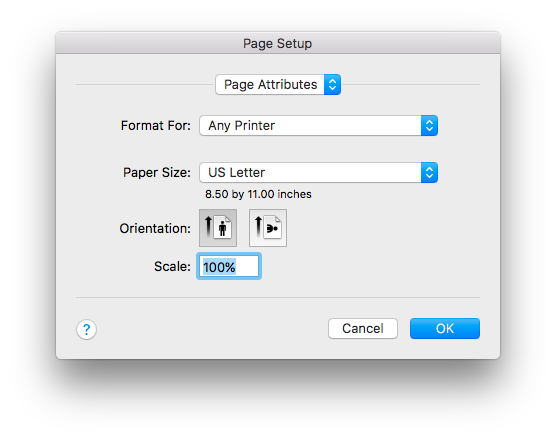
If all looks ok here, there may be a setting changed on your printer, causing the form to print reduced.
Copy link to clipboard
Copied
Kelly
Thanks. Nothing on the printer has changed. Locally stored pdf's print just fine. This is and insurance form that is on the web and has not changed in 2 yrs. It printed fine last fall when I printed it. Wondering if adobe does anything with it. All my other prints work fine on the printer. Acts like any pdf from the we has the issue.
Copy link to clipboard
Copied
Are you trying to print from the browser? If so, can you right-click on the link to the form and save it locally to print directly from Adobe Reader DC?
Copy link to clipboard
Copied
Yes I was trying to print direcrly from the browse as this has always worked for me. I did a right click on the form, saved it to the local machine and then opened and print it successfully from Adobe Reader DC. I will need to remember this in the future.
Thank You for your help.
Copy link to clipboard
Copied
If you are having this issue with all PDFs from the web, I recommend you open them in Adobe Reader instead of your web browser. Here are instructions:
How do I open a PDF in Acrobat instead of the browser?
- In Adobe Reader Choose Edit > Preferences
- Select the Internet category on the left
- To open PDFs from the web directly in Acrobat, uncheck "Display in browser

Copy link to clipboard
Copied
Check File>Print>Page sizing and handling and be sure that "Actual size" is selected.
Copy link to clipboard
Copied
page sizing is set to actual size. locall stored pdf's on pc print fine. this insurance form comes from the web, has not changed in over 2 yrs, and printed fine last fall when I accessed it.


Get ready! An upgraded Adobe Community experience is coming in January.
Learn more
 AdChoices