
Participant
July 14, 2023
Question

PDF to Excel formatting

  • July 14, 2023
  • 1 reply
  • 691 views

Hello Community 🙂 


I am using Acrobat Reader DC, and would like to ask you about convert PDF to Excel.

After converting, seem everything is fine, but then i realised that some cells are not splitted correctly.


Lets have a look, this is Snip from PDF file:
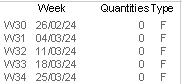
 

and here we go with Excel file:
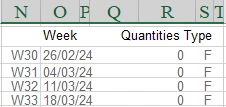
 

Is there any format settings to split those data cells? Some of them are already splitted:
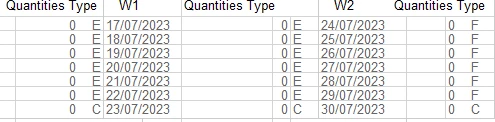
So, basically my question is. Can i adjust splitting(even if manually) those cells?

If i am trying to use split and margin cells, all datas are staying in that one cell.


I will be glad for every beneficial "how to" idea. 


Thank You 🙂 

Best Regards.

This topic has been closed for replies.

1 reply

Meenakshi Negi
Community Manager
Community Manager
July 14, 2023

Hi Viktor31074763g3hk,


Thank you for reaching out.


As you use Acrobat Reader, please let us know how you convert the PDF to an Excel file.

It seems more of an Excel-related question if you are looking for a way to split the cells and margins in an Excel sheet. I would suggest getting in touch with the Microsoft support team. They will be able to guide you with more information about the application.


Thanks,

Meenakshi

Participant
July 17, 2023

Hello Meenakshi,


Thank you for reply.

As always starts with opening PDF document, after that using Convert PDF

Choosing exporting file type 

Even when i'm trying to use XML Spreadsheet, Cells are not in correct columns.


Thanks.

Viktor.