
Participant
January 7, 2025
Question

PDFs look good in all apps except Adobe Reader

  • January 7, 2025
  • 1 reply
  • 517 views

Hello!

I'm having an issue with some PDFs I'm generating and Adobe Reader.

In particular, my PDFs look good in all apps I've tried (Chrome, Foxit, Firefox, Edge, Sumatra etc.), but in Adobe Reader all the rasterized (non vector) images in the PDF look awful, all pixelated and with ugly aliasing around the borders.

Here is an example of what I mean:
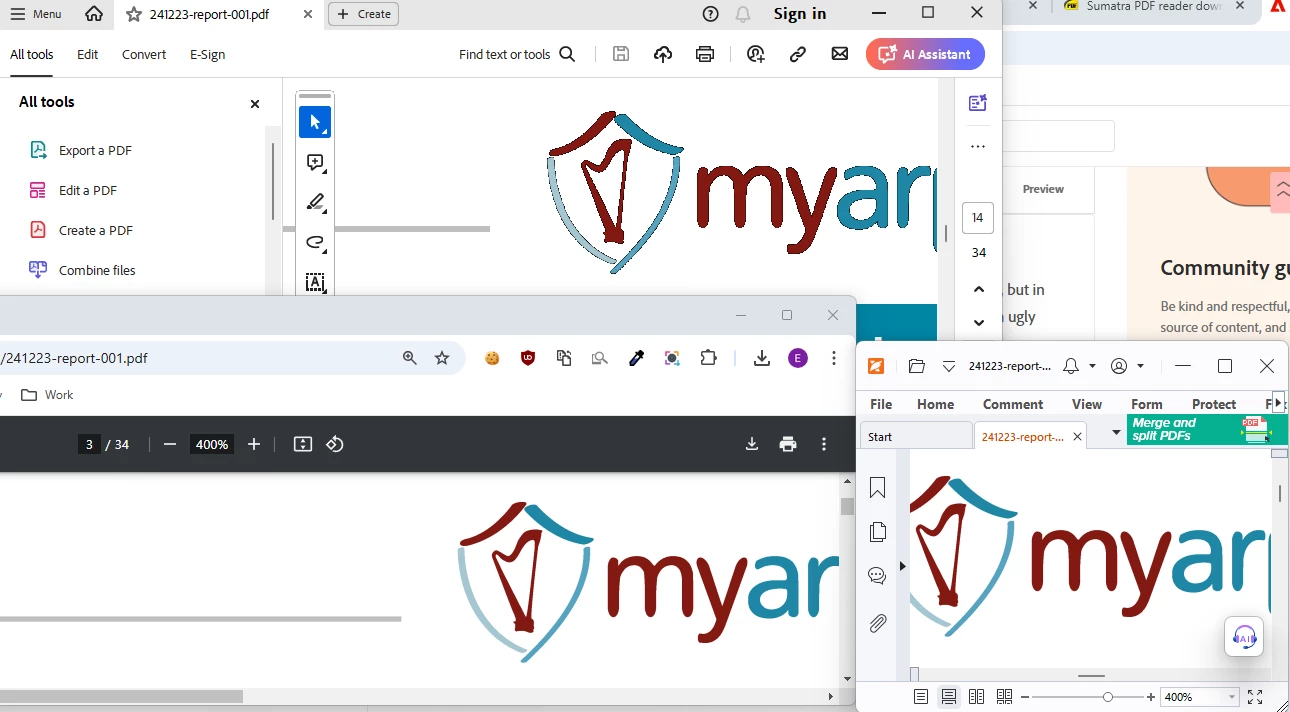
 

In this image you can see the same PDF file opened in Adobe (top), Chrome (bottom left) and Foxit (bootom right).

As you can see, the shown image looks smooth and nice in Chrome/Foxit, but in Adobe it is all aliased and has an ugly black contour that is not present in the original PNG image.


Can anyone tell me why this happens? And why it happens only in Adobe? Note that the PDFs are generated by Microsoft's Sql Server Reporting Services, if that's important.

1 reply

CharuMaheshwari
Adobe Employee
Adobe Employee
February 20, 2025

Hi,


Sorry for the inconvinience.

Can you please share the below details that will help us in debugging and resolving the issue:
1. OS version of your machine

2. Reader App version that you are using

3. Any sample file, if not with sensitive information.


Thanks 

Charu Karwa

tarockxAuthor
Participant
May 27, 2025

Hello, sorry for the late reply. Here's some additional info:

  1. I'm running Windows 11, but the issue also happens in Windows 10
  2. Using Adobe Reader 25.001.20474
  3. I'm attaching a sample file to this post. The file contains a simple PNG with a red shape and the rest is transparent. Here is how I see it in Adobe Reader vs Chrome, notice the jaggy black contour around the red shape that only appears in Adobe (left):


Thanks for your help.

S_S
Community Manager
Community Manager
June 16, 2025

From what I can tell visually, it seems to me that the bug is that when a pixel of a PNG is semi-transparent (has an alpha value different from 0 or 255) all the other viewers render it correctly as a semi-transparent pixel, while Adobe Reader renders it as a black pixel for some reason...


Hi @tarockx,


Hope you are doing well. Sorry for the trouble with viewing shapes and designs on Acrobat.


What I tried is, go to Preferences > Page Display > uncheck "Smooth Images," and the black lines disappeared.


In case you are still looking for a solution, you can try this and let us know how it goes.


Regards,
Souvik.