
Participant
December 14, 2017
Answered

pencil woes

  • December 14, 2017
  • 2 replies
  • 3543 views

When I use the pencil tool in Reader, I cannot draw with it; rather, it just makes dots. (When I use Acrobat, however, I am able to draw with the pencil.)

How do I fix this? I'm trying to show students how to use the pencil tool, and making only dots with it isn't useful.
Correct answer jane-e

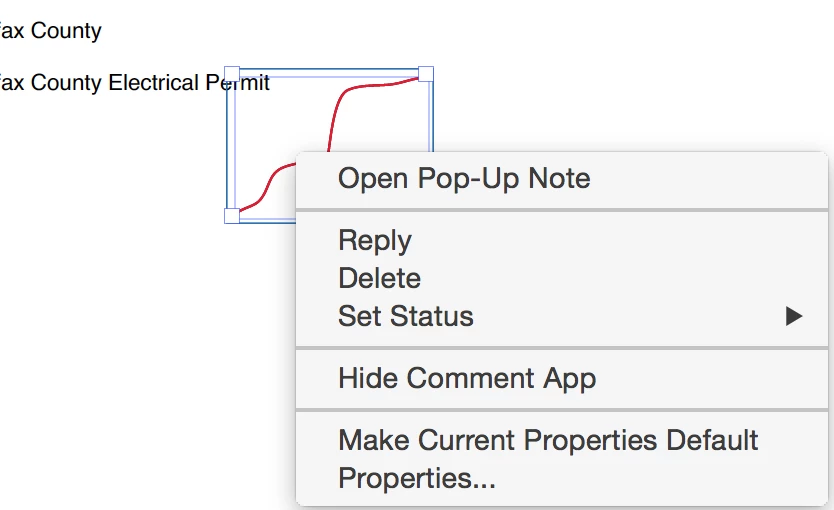
Select the Comment (the Pencil drawing) > Right Click > select Properties from the context sensitive menu. 


What does yours show?


2 replies

Participant
November 11, 2022

I am having the same problem

There does not appear to be anything that makes any changes on the right click menu


Participant
March 22, 2023

Happened to me as well, both times I just made sure I had the latest updates and it worked properly without any setting changes. This last one, it did have a pop-up that said Touch Mode Auto-Detect had been enabled (or something similar). Can find this option in Edit-Preferences-General- Touch Mode is about halfway down.


Participant
January 23, 2024

I got the pencil as a dot problem to go away changing the "Touch Mode" to "NEVER"

jane-e
Community Expert
Community Expert
December 14, 2017

What does it say when you bring up Properties for the Pencil tool?

And is this happening on all machines or just yours?

Participant
December 15, 2017

How are you able to access the pencil's properties? Also, once you do that, what property would you change to make the pencil actually draw rather than make dots?

jane-e
Community Expert
jane-eCommunity ExpertCorrect answer
Community Expert
December 16, 2017

Select the Comment (the Pencil drawing) > Right Click > select Properties from the context sensitive menu. 


What does yours show?