How don't use Adobe Acrobat. I only need Adobe Reader, but Adobe Acrobat has just started opening my screen grabs. I need to stop it. But how? I really do not want this software and am worried how much this is disturbing my workflow.
Thank you for your message. I followed your instructions to disable Adobe Acrobat Reader DC messages on startup. After rebooting, the issue persists. Any further guidance or assistance would be appreciated.
Would you mind sharing the screenshot of the pop up message that you are getting? Also make sure you have the application updated to the latest version 23.08.2042X Go to Help > Check for updates and reboot the computer once.
Acrobat Reader 7 Day Free Trial pop up has ruined my computer. Cannot work with any pdf or other documents. How do you get rid of this pop up from hell.
Well, you're getting the message because you paid for Acrobat but aren't using it. So why not fix the message by actually using what you pay for? Would you like some assistance in understanding what is going on? This is a confusing area, but suppressing messages isn't the solution.
what an aggrevating comment. People have reasons to open whatever software they want. they shouldnt be forced to click through pop ups to use the software they are trying to use....how about a simple do not show this again checkbox?
are you kidding me? Adobe will never fix this "problem" they don't care about users. they only care about subscriptions and keeping their investors happy. It truly is a non-caring-about-user-company. I care about people, i know. I know what not caring about people looks like and Adobe is a perfect example of what not careing about people looks like. I've had problems in other adobe products. Bugs that have persisted for over a decade and still they refuse to issue a fix because they just dont care. they really dont. If i were you reading this, i'd go straight to the cancel subscription button and cancel them like really soon. it's the only way adobe will register tht there is a problem. they dont monitor software issues, they monitor quarterly results. thats it.
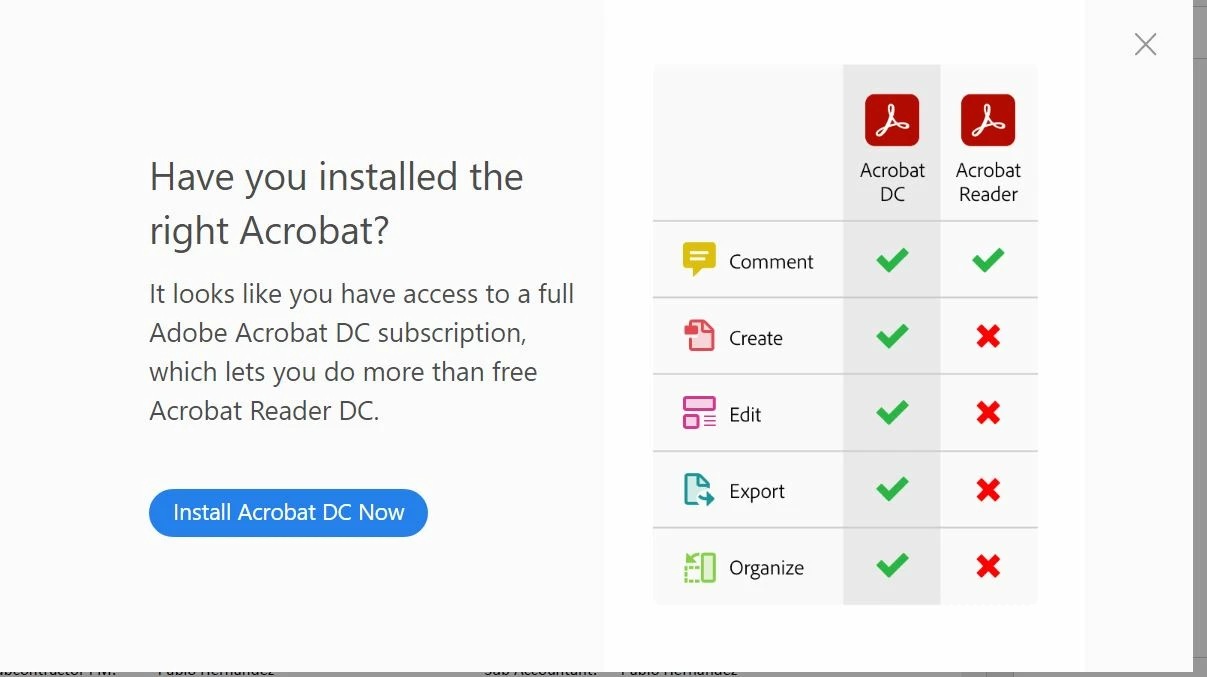
Hope you are doing well and sorry for the trouble. As described you are getting the pop up 'have you installed the right Acrobat'
Please go to Edit (Windows), Adobe Acrobat (Mac) > Preferences > General > Under, Messages from Adobe , Uncheck 'Show me messages when I launch Adobe Acrobat Reader DC ' > Click OK and reboot the computer once and see if that helps.
Let us know if you experience any trouble and need more help.
That didn’t work. I unchecked, clicked ok, rebooted and still get the pop up. I unchecked again, check don’t show pop up’s whne I open pdf, clicked ok, rebooted and still get pop ups. It’s not saving.

 AdChoices