
Participant
January 15, 2024
Answered

´Preparing the Document for Reading´?? iT WONT STOP!

  • January 15, 2024
  • 2 replies
  • 25994 views

Hi,

Everytime I open a PDF I get the message saying ´Preparing the Document for Reading´ and it freezes my screen. The files arent even that big. 500kb to 3mb. Ive goolged the fix and all I can find is the following:


1. Go to Edit > Preferences > Reading.

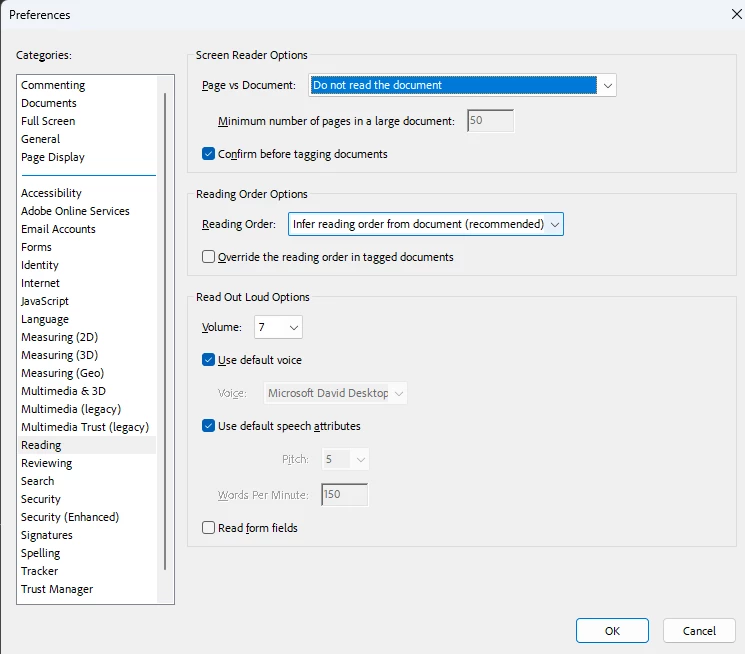
2. Under "Screen Reader Options" select "Only read the currently visible pages".


This only for that one document and as soon as I open another email with an attachmeent the same thing happens???  It doesnt seem to save it as default?


I´ve opened Acrobat Reader and I have the latest version, (2023. 008. 20458) no updates available, continuous release and using a new Lenovo laptop with Windows 10. 


What can I do?


[Moderator moved the thread to the correct forum]
Correct answer JustTryingToHelp

I believe that the screen reader option must have accidentally been turned on. I found the setting in the application preferences under "Reading".  I just set the " Page vs Document" option as "Do not read the document".  It seemed to clear up this issue I was having.

2 replies

Participant
April 27, 2024

I have the same problem.  Is there a fix?

JustTryingToHelpCorrect answer
Participant
June 28, 2024

I believe that the screen reader option must have accidentally been turned on. I found the setting in the application preferences under "Reading".  I just set the " Page vs Document" option as "Do not read the document".  It seemed to clear up this issue I was having.

Participant
January 14, 2025

I am using Adobe Acrobat Reader. I am too getting the same error. I am unable to find the application preferences button. Could you please tell me where to find it?

Abambo
Community Expert
Community Expert
January 15, 2024

What is your OS and version?

ABAMBO | Hard- and Software Engineer | Photographer
Participant
January 22, 2024

I use a windows 10 laptop, automatic updates for microsoft 365 so current version of all applications and my adobe is up to date with current version. What other info can I provide?