
Participant
February 11, 2021
Answered

Printing problems with new 02/2021 update.

  • February 11, 2021
  • 3 replies
  • 1080 views

Hi, there appears to be a problem with the latest update.  I print documents that have mixed page sizes (letter and legal).  My printers have two paper trays and normally when I select "Choose paper source by page size" it will automatically print the correct page size.  It appears that since the new update reader is not recognizing page sizes and printing everything on letter size.  I have confirmed that other people in my line of work are having the same issue starting today as well.
This topic has been closed for replies.
Correct answer defaultxt7r8z40pao3

I found the following solution in this forum and it seems to work:


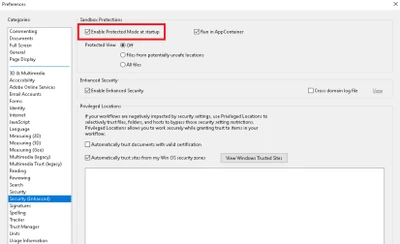
Steps to turn off the 'Protected Mode' :

  1. Launch Acrobat
  2. Click on Edit (from Menu Bar) > Preferences
  3. Click on 'Security (Enhanced)'
  4. Uncheck 'Enable Protected Mode at startup (Preview)' > Click Yes (on popup)


5. Click on OK > Close & Re-Launch application and check.

3 replies

Participant
February 22, 2021

I have rebooted my printer and computer and .pdfs will only come out blank. The Enable Print Mode is NOT checked in my program. Does anyone else have any ideas?

February 11, 2021

I also I'm having the same problem trying to fix it for a couple hours now smh.


defaultxt7r8z40pao3AuthorCorrect answer
Participant
February 11, 2021

I found the following solution in this forum and it seems to work:


Steps to turn off the 'Protected Mode' :

  1. Launch Acrobat
  2. Click on Edit (from Menu Bar) > Preferences
  3. Click on 'Security (Enhanced)'
  4. Uncheck 'Enable Protected Mode at startup (Preview)' > Click Yes (on popup)


5. Click on OK > Close & Re-Launch application and check.

February 11, 2021

OMG thank you so much


Participant
February 11, 2021

I am having printer problems also and it is killing my business  HELP FIX it