
April 20, 2015
Answered

Problem with printing barcodes

  • April 20, 2015
  • 8 replies
  • 45681 views

I have completed a form from Canada Immigration which is supposed to generate barcodes after it is validated.  The form appears to validate correctly, and adds a page for the barcodes, but does not display or print the barcodes. I know the Canadian Immigration office will not accept the form without barcodes ..... can anyone help.  As this is a widely used form, I'm confident that the form itself is OK.

For reference I am using an iMac machine, and have downloaded the 2015 version of Acrobat Reader DC

Many thanks - Chris
    This topic has been closed for replies.
    Correct answer lardissone

    I assume you got it working, but I had that issue and found a way to solve it. I leave it here for other Googlers who arrives here with the same issue:

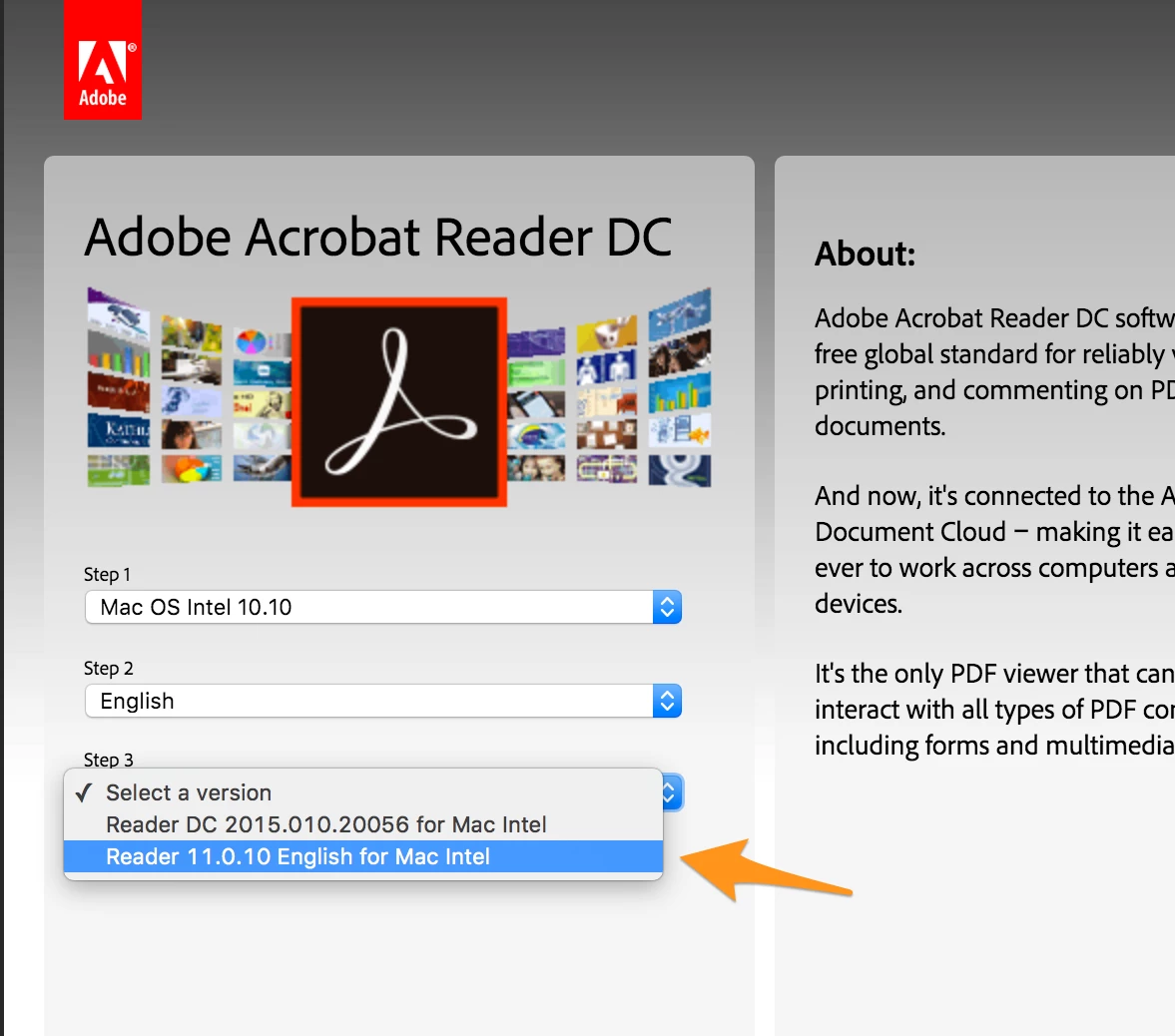
    Download Adobe Acrobat Reader, not Adobe Acrobat Reader DC.

    On the web to download Acrobat Reader select your operating system, language and then the version that doesn't contains the DC in the name (at the moment of this writing the current version is: Reader 11.0).

    8 replies

    Participant
    October 16, 2019

    The Print as Image Solution does not work for me, and I have no way to download a different version of Adobe.

    This is what worked: In Adobe, I went to File + Print. Under Comments & Forms, I changed my setting from Documents to Documents & Markups. The barcode did print.

    Participant
    February 12, 2018

    I have same problem. I am using acrobat pro dc , so as i saw your recommendation  and checked for other version of adobe reader , I didn't see any other version except acrobat dc . so whats wrong with that ???

    when I clieck on validate to generate barconde , the page for barcode will created but it does not like a barcode . just a simple code like imm008-12-01 up to 09

    so ?!?!

    try67
    Community Expert
    Community Expert
    February 12, 2018

    Go to the page above and select Windows XP as your OS and you'll get a link for Reader XI.

    Participant
    December 5, 2017

    Thank you! This worked!!

    Participant
    November 20, 2017

    Thank you so much, bro. 

    I had the same issue and I got it solved.

    lardissoneCorrect answer
    Participant
    February 19, 2016

    I assume you got it working, but I had that issue and found a way to solve it. I leave it here for other Googlers who arrives here with the same issue:

    Download Adobe Acrobat Reader, not Adobe Acrobat Reader DC.

    On the web to download Acrobat Reader select your operating system, language and then the version that doesn't contains the DC in the name (at the moment of this writing the current version is: Reader 11.0).

    Participant
    June 13, 2016

    Thank you! I've been searching for weeks for a solution, and your advice to use Adobe Reader instead of Adobe Acrobat Reader DC finally worked. Hard to believe the Canadian government has not noticed this problem and fixed it by now.

    try67
    Community Expert
    Community Expert
    June 13, 2016

    Actually, this is something Adobe needs to fix, as the bug was introduced in the latest version of Reader by them.

    December 26, 2015

    Hello .. any solutions for this .. I am having the same problem on mac . Validated the forms no barcodes. Please help . Thanks

    try67
    Community Expert
    Community Expert
    December 26, 2015

    Make sure you update to the latest version available of Reader. It might solve this problem.

    Participant
    July 15, 2015

    same problem for me on a Mac: validating doesn't produce bar codes. i guess i have to dust off old Windows PC as start the applications all over unless someone has answer to original question (Bar codes not producing on a Mac with Reader DC)?

    pwillener
    Legend
    April 21, 2015

    Did you fill that form online at the website, or did you download it first to your local disk and fill it from there?

    Also, can you post a link to that form?

    April 21, 2015

    I downloaded the form and completed it locally.  Maybe that was my mistake, but the website allowed me to download!

    You can find IMM5257 in the search box on this page.     Find application forms and guides

    Many thanks for your help.

    Chris

    pwillener
    Legend
    April 21, 2015

    I downloaded the form to my local disk, filled in the required data, then clicked on the Validate button.  It created these barcodes (near the bottom of the form):

    (using Reader DC on Windows 7).