
Participant
July 23, 2020
Question

Problemas para firmar con certificado digital en Adobe Reader XI

  • July 23, 2020
  • 1 reply
  • 737 views

Cuando voy a guardar  me sale el siguiente mensaje y no me deja reemplazar el archivo original:
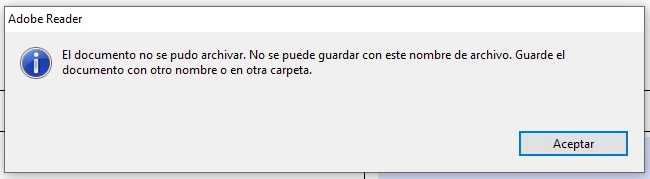
No puedo cambiar el nombre ni la ruta donde esta guardado, esta en un file server.

En lo que me puedan ayudar estaré agradecido.

This topic has been closed for replies.

1 reply

Amal.
Community Manager
Community Manager
July 24, 2020

Hi Elias,


We are sorry for the trouble. As described you are unable to save the PDF on the file server.


Please try to turn off the protected mode and see if that works for you. Go to Edit > Preferenced > Enhanced Security > Uncheck  'Enable protected mode at startup' also Turn off the ptotected mode and uncheck the enhanced Security > Click OK

Note : Please turn on the security after testing.


You may also refer to a similar  old discussion here https://community.adobe.com/t5/acrobat/error-while-saving-a-pdf-file-to-a-mapped-drive/td-p/5270686?page=1


Adobe Acrobat XI is an old and EOL application. For more information please take a look at help page https://helpx.adobe.com/in/acrobat/kb/end-of-support-acrobat-xi-reader-xi.html


Hope it will help


Regards

Amal

Participant
July 24, 2020
How do I turn on protection mode?
Raelene Sanchez
Amal.
Community Manager
Community Manager
August 9, 2020

Hi there


To turn on the protection mode, please take a look at the help page https://helpx.adobe.com/reader/11/using/protected-mode-windows.htmland see if that works for you


Regards

Amal