Participating Frequently
October 22, 2012
Question

Problems displaying russian characters in Adobe Reader

  • October 22, 2012
  • 1 reply
  • 32437 views

Good afternoon.

There is a file pdf, received from the customer. Most of it contains Russian letters. As a result, the latest version of Adobe Reader in Windows Vista and Mac OS (10.5.8 and 10.8.2), these characters do not display properly.
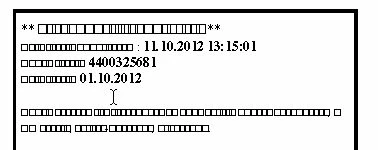
In Windows XP, 7 and 8 display problems are observed.
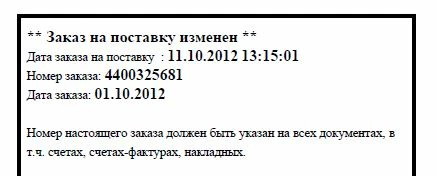
Ironically, Windows Vista and Mac OS that file correctly displays the program Foxit Reader and NeoOffice. MacOS also tried to open the file, adobe acrobat, but it is also not display the characters of the Russian alphabet. In what could be the problem?

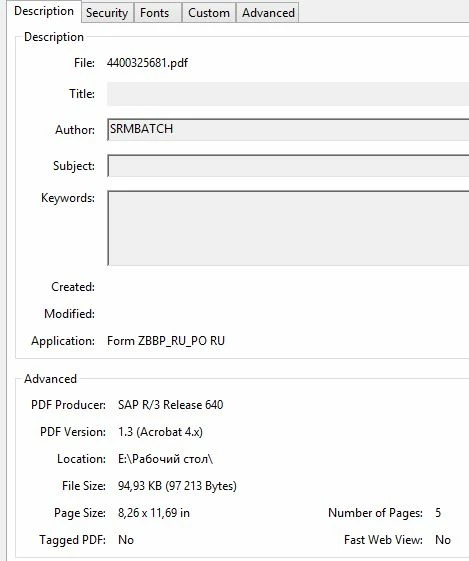
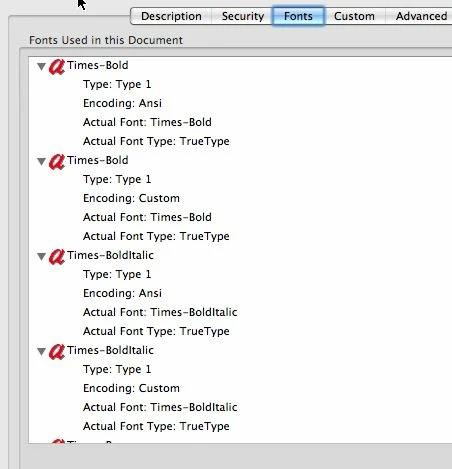
Properties problem file:
Here is the Fonts tab in Mac OS:
This topic has been closed for replies.

1 reply

Mylenium
Legend
October 22, 2012

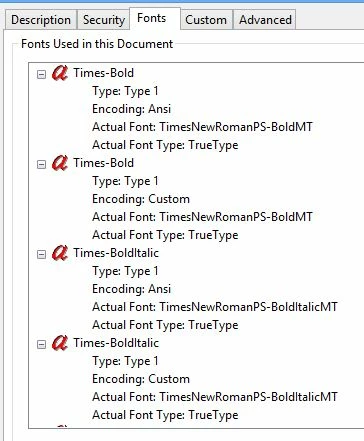
Your fonts are listed as Ansi, meaning they will use the system's default language to display their encoding. In Windows set the "Default encoding for non-Unicode" to something that is compliant in your Region and Language control panel. There's a similar option on your Mac panel somewhere, but I keeep forgetting what exactly it is called...

Mylenium

Legend
October 23, 2012

I fear I must disagree. There is no case in which a PDF contains (page) text to be shown in the "default's system language" even though some applications might interpret ANSI that way. PDF is much more strictly defined by that, though it can be set up to use system fonts, it does not use system encoding (unless the fonts are really weird).

What it means is that the font's encoding (mapping from character numbers to characters to show) happens to match ANSI.

This, it seems to me, is a problem since what PDF means by ANSI doesn't include any Russian characters.

I have a couple of ideas:

1. There are OTHER fonts in the PDF further down the list.

2. The creator of the PDF wrongly used a Russian font without marking it as having a Russian encoding AND some other software wrongly picks this up and displays as expected. This is perhaps stretching a point.

It would be interesting to see more of the font list, even more interesting to see the PDF.

rus-onixAuthor
Participating Frequently
October 23, 2012

Thanks, I've got it. Looks fine in Acrobat X Pro. Do I have it right that you only see the problem in Adobe Reader XI (11)?


Not quite right. The problem arose in Adobe Reader 10,11 and Acrobat. Google chrome in the same problem, if you open a file on my link ..