

"Acrobat quit unexpectedly" error but without crash
Hello, community!
I have a user who is getting this window when using Adobe Acrobat Reader. I have seen the same for Acrobat Pro in the past with other users. It says "Acrobat quit unexpectedly. Click 'Learn more' for possible fixes." The "Learn More" button brings me to the following webpage.
https://helpx.adobe.com/acrobat/kb/fix-acrobat-crash-on-launch.html
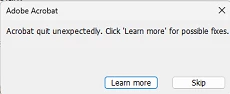
The thing is, Acrobat runs perfectly fine during this and does not crash. This window just randomly pops up while using it or when closing Acrobat. I've seen cases in the past where it randomly pops up even if the user isn't even using Acrobat upon logging into Windows or after using the computer for a while at random. Acrobat does not actually crash, but this popup is annoying for my users.
I have tried checking for updates and running a repair on Acrobat. Confirmed "Protected View" was turned off.
Any ideas as to what causes this and a solid solution to fix it?
Thanks!
 AdChoices