
New Participant
May 20, 2016
Answered

"the credential selected for signing is invalid"

  • May 20, 2016
  • 5 replies
  • 51450 views

I am a Mac user running on OS X El Capitán vers. 10.11.14 who just installed the Adobe Acrobat Reader DC program so that I could sign ACA (Autoridad de Certificación de la Abogacía -Spain-)  documents. When I attempt to sign these documents using my ACA certificated (common access card) via my smart card reader, I get the error message: "the credential selected for signing is invalid". My ACA credentials should not be the issue, as I've used it on work computers without signature problems, so I'm thinking that the issue i'm getting on my Mac is related to my current Adobe settings. Any advice or assistance in regards to signing documents with my ACA card would be greatly appreciated. Hopefully, I can get some real assistance instead of a generic copy and paste "trouble shooting" response. Thank you
This topic has been closed for replies.
Correct answer challaganmadrid

I found it!

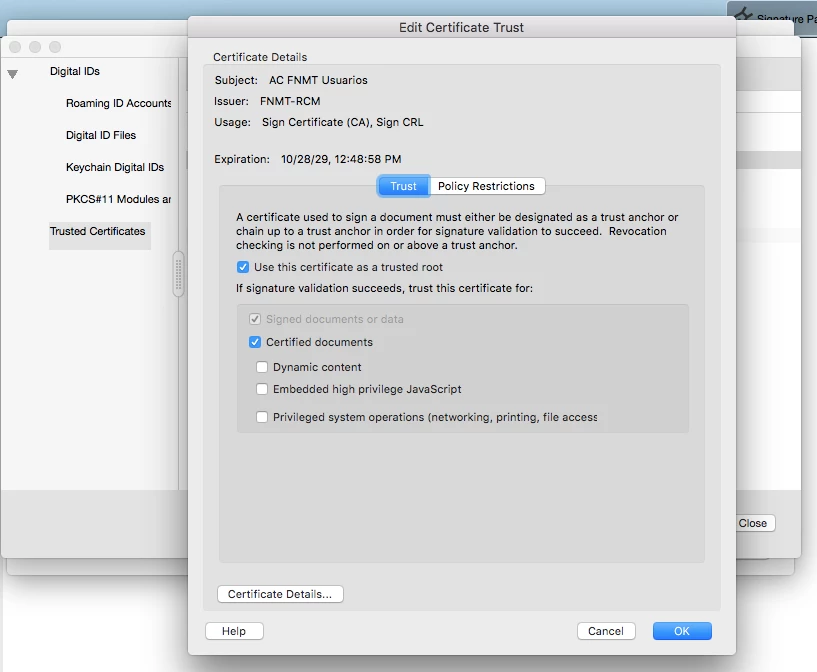
This "the credential selected for signing is invalid" message appears when you use a trusted certificate as a trusted root. Probably because Adobe finds something wrong in the trust chain.

Just by *disabling* the checkboxes below the message disappears and digitally signing works:

Enjoy it


5 replies

New Participant
October 7, 2023

Hi, none of this tips are working for me. I'm using Smart ID Card from Estonia. 

Could you help please?


I did all: 

-Check option -> Require certificate revocation

-Update both Adobe and Mac IOS

-Restart computer 

challaganmadridCorrect answer
New Participant
December 23, 2020

I found it!

This "the credential selected for signing is invalid" message appears when you use a trusted certificate as a trusted root. Probably because Adobe finds something wrong in the trust chain.

Just by *disabling* the checkboxes below the message disappears and digitally signing works:

Enjoy it


New Participant
March 23, 2022

Thank you so much, it worked!!!

Finally found the right answer


Adorobat
Community Manager
Community Manager
August 23, 2016

Hi all,

You may try this workaround suggested by one of the user in post # 16 here : 10.11.6 CAC signing not working with 11.0.17 Acrobat

Thank You,

Shivam

New Participant
August 23, 2016

I tried, however, I am fairly Tech savvy but not THAT Tech savvy....

1) How do I verify permissions? The only thing I can do is click on Get Info for /Library/CACKey/libcackey.dylib and allow read and white permissions. I have no idea how to verify -rwxr-xr-x (755) owned by root?

2) Nowhere in Adobe Reader DC, open Preferences, then go to Signatures --> Identities & Trusted Certificates --> More... could I find "PKCS#11 Modules and Tokens" or anything after that.

Participating Frequently
August 24, 2016

1) Open a Terminal (click spotlight and type terminal)

in the terminal type:

ls -lart path_to_your_lib

That will list all the files in that directory and their permissions post that back if you are unsure. I actually don't think that the execute permissions are required (at least not with Centrify)

Look at that other thread mentioned above for the paths it depends on what smart card middleware you are running. My posts have the path for where Centrify is installed (note I don't think the necessary libraries are included with Centrify Express) other posted for libCAC, I've never used that one so I don't personally know the paths. It may take some searching around you may want to watch a basic video on navigating a unix filesystem if you are not familiar with using a terminal and the cd and ls commands.

2) Open Adobe Acrobat Reader DC

In the top menu (Where it says Acrobat Read) click preferences

Select Signatures in the Preferences window

Under Identities & Trusted Certificates click the MORE button.

The PKCS#11... is in this window when you click it you get the option to "Attach Module" on the top.

New Participant
August 18, 2016

Having the same issue; can't sign anything using my Common Access Card. Tried both this remedy and the one referred to on the other post with no avail. This issue is preventing me from working from my personal computer (MacBook Pro Version 10.11.6 OS X El Capitan)

New Participant
August 23, 2016

I have to the same issue. I still can't sign with my military CAC and its causing a lot of headache. I am required by the military to sign documents with my CAC card and am unable to at this time. Is there any update on this issue? (MacBook Pro Version 10.11.6 OS X El Capitan).

Community Manager
May 20, 2016

HI susanag95901292

Please try the steps given below :

1.Select the Acrobat > Preferences menu item

2.Select Signatures from the Categories list box

3.Click the More button in the Verification group box (second from the top)

4.Deselect the Require certificate revocation checking to succeed whenever possible checkbox

5.Click the OK button on the Signature Verification Preferences dialog

6.Click the OK button on the Preferences dialog

Try to sign and see what happens.

Please let me know how t goes

Regards,

Yatharth .

franks66222332
Participating Frequently
August 4, 2016

Hello,

Different user, same issue. I tried this and I still have the problem. Is there a way to debug exactly what is invalid? According the Keychain, my digital cert from my CAC is valid and not expired.