
October 29, 2019
Question

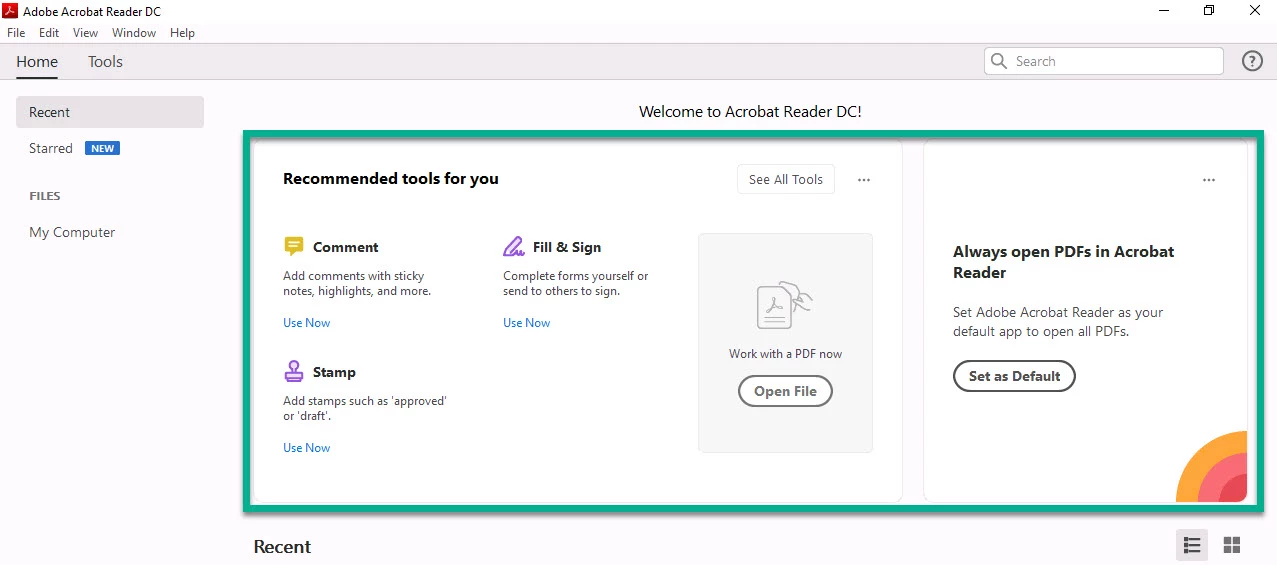
Reader DC - Disable Home screen Welcome to Acrobat Reader DC!

  • October 29, 2019
  • 1 reply
  • 4679 views

Is there a way to disable Recommended tools for you and Always open PDF's in Acrobat reader tiles on Home tab in Reader DC 19? I have tried using FTEDialog, bShowWelcomeScreen, bHideUnreadMsgAtLaunch, and bUsageMeasurement but nothing has worked. 
 

    This topic has been closed for replies.

    1 reply

    Participant
    February 13, 2020

    Hi!
    +1. Any ideas?
    Terv, Alar.

    Adobe Employee
    February 14, 2020

    Hi,

    Thanks for raising your consern here.

    You can always minimize this section. Using three dots on the top of cards/tiles choose to Collapse All.

    Do let me know if this is helpful.

    Thanks,

    Charu Karwa


    Known Participant
    June 9, 2020

    I have the same issue but still no resolution.  I already have a 'Tools' Tab for my users so, is there a way to remove the Tool Suggestions listed at the top of the recent files pane?