
Reader x64 identifies as "Adobe Acrobat DC (64-bit)"
Hi;
I have been trialling your 64-bit version of Reader available to select markets with a view to making it available for my organisation. Currently I am deploying using a script. Previously the Software, when installed, identified in the Apps list as "Adobe Acrobat Reader DC" (sometimes with "(MUI)" on the end); however, the latest x64 release identifies thusly (taken from a German virtual machine):
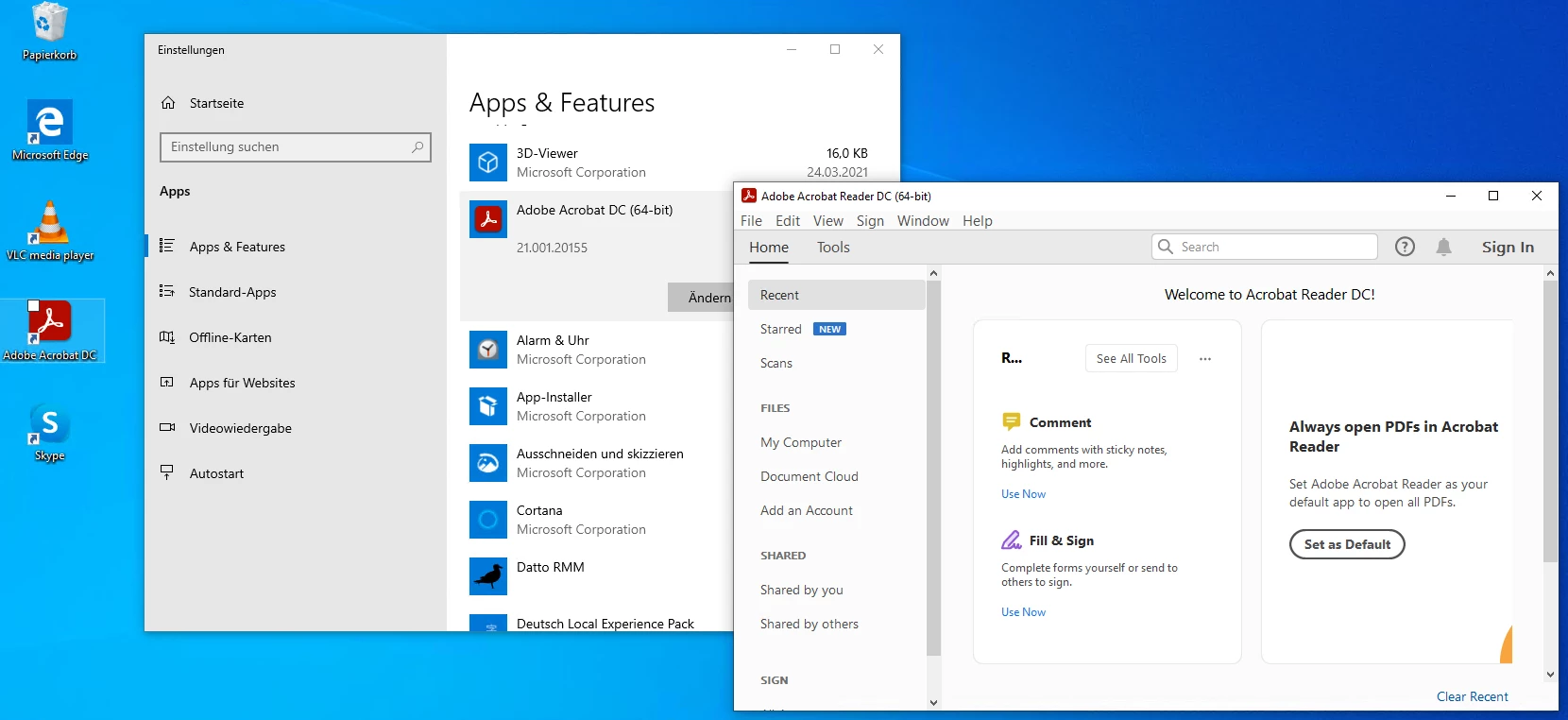
The Reader x64 base MSI has not yet been made available, so it is unclear whether this is an issue that will affect dyed-in-the-wool Enterprise installations, but for those downloading the EXE and installing it today, this is disastrous; it means there is no longer any proper way via the Registry to tell whether Adobe Acrobat or Acrobat Reader is installed on the system, and thus no proper way to react to this.
Is this a simple branding error or is this intentional?
 AdChoices