
longhorn steer
Participating Frequently
August 19, 2019
Answered

Reopen PDFs from last session - how to enable ?

  • August 19, 2019
  • 7 replies
  • 98681 views

= D is underscored for key equivalent, but disabled [shaded out]: ...

reader just updated, i rebooted, after screencapping window list of docs.

want to reload "from last session" but no go.

old user, slow learner, cranky but friendly - will pull up the hard way,

but would MUCH prefer being able to Reopen last session docs.

fairly knowledgeable wrt OPs and programs etc.

tell me a joke, too. thanks for your help!
Correct answer Amal.

Hi There,

Apologies for the trouble caused, as described above you have updated the application to the new version and want to reopen the PDF from the last session, correct?

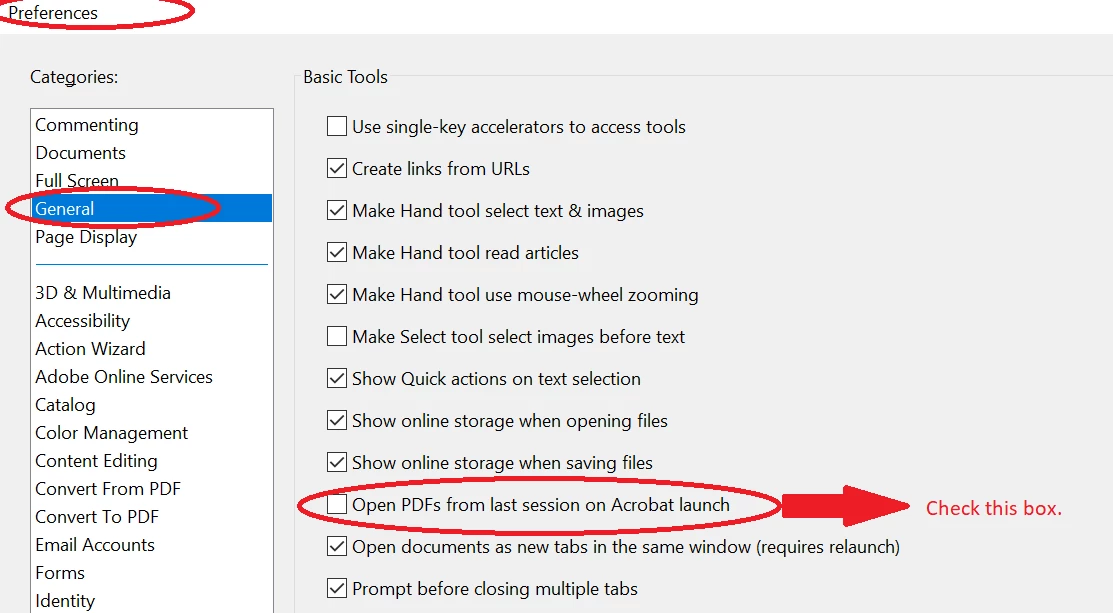
With the new release v19.12.20036, now we can manually set the preference to reopen the PDF from the last session. Go to Edit (Windows), Adobe Reader / Adobe Acrobat DC (Mac) > Preferences > General > Check, Open PDF from the last session on Acrobat launch> click Ok

For more information, you may also refer to the help article - What's new in Adobe Acrobat DC

Let us know if you need more help

Regards,

Amal

7 replies

New Participant
November 21, 2024

I found one way that works for me. So i did as the pinned answer said. Didn't work.

It works when i also ticked this.  Preference>Documents> Restore last view setting... 

as shown in the screenshot here. 


I didn't bother trying without the recommendation first. If it works it works

I hope this helps 

New Participant
April 24, 2024

I am trying to activate this setting in Acrobat X Pro, but my Preferences screen is different from the one shown by Amal in the example, above.  I have no box (clickable or otherwise) or option for “Open PDFs from last session on Acrobat launch” at all.   >confused<  This is a partial screenshot from my Preferences :


As you can see, my Preferences > General has far less available options.  This might be a version issue as my software is over ten years old.  If anyone can tell me how, on the version of Acrobat I have, to set it to re-open all the PDFs I had opened the last time I was using the program, I’d really appreciate it.  Thanks in advance.

try67
Community Expert
April 24, 2024

This option did not exist in Acrobat X.


However, you can save and load sessions (although not automatically) using a script, like this (paid-for) tool I've developed: https://www.try67.com/tool/acrobat-reader-save-and-load-sessions


New Participant
August 22, 2023

Adobe -> Please make this setting the default behavior!!

New Participant
October 13, 2023

I am using a Macbook and I can't sort this yet.

Adobe Employee
October 17, 2023

Hi @JIMOH32901955l00z


You can open Preferences from Cmd+K which will open Preferences Pane, then select General > Check, Open PDF from the last session on Acrobat launch> click Ok.

Relaunch Acrobat and changes would be reflected on Macbook.


Also, @Jeff32215096kt82 we have taken you feedback to make this Preference On by default.


-Bhawna (Adobe)


New Participant
December 11, 2022

The solution recommended under "Correct answer" - to change the settings in preferences - does work.

However, my question is  - how do make this setting persist?
I set this setting a while ago, but it switched off on its own.

try67
Community Expert
December 12, 2022

It should remain checked. Maybe an update reset it, though.

New Participant
September 20, 2020

I did this but it is not working. Works on one laptop. Does not work on another one. Any idea why?

New Participant
December 5, 2020

Reopen PDFs from last session still grayed out. How do we enable it?

Bernd Alheit
Community Expert
December 6, 2020

Enable also the entry "Open documents as new tabs in the same window".

Amal.
Community Manager
Amal.Community ManagerCorrect answer
Community Manager
August 19, 2019

Hi There,

Apologies for the trouble caused, as described above you have updated the application to the new version and want to reopen the PDF from the last session, correct?

With the new release v19.12.20036, now we can manually set the preference to reopen the PDF from the last session. Go to Edit (Windows), Adobe Reader / Adobe Acrobat DC (Mac) > Preferences > General > Check, Open PDF from the last session on Acrobat launch> click Ok

For more information, you may also refer to the help article - What's new in Adobe Acrobat DC

Let us know if you need more help

Regards,

Amal

longhorn steer
Participating Frequently
August 19, 2019

Amal - you are the best of the best. thank you so much.
i hope others you help celebrate your knowledge, too,

not to mention how kind and friendly and "easy on the eyes."

have a very good week ♥

longhorn steer
Participating Frequently
August 19, 2019

anybody have any idea why this came to my USA mailbox ?
if it was YOU -- why the characters ? or ... is that the joke ?