Answered
Schaltfläche - Schaltfläche-Button nicht existent
Hallo an alle,
ich habe ein einziges Formular, in dem der Button "Schaltfläche hinzufügen" nicht vorhanden ist.

Woran kann das liegen?
Herzlichen Dank für jede hilfreiche Antwort!

Hallo an alle,
ich habe ein einziges Formular, in dem der Button "Schaltfläche hinzufügen" nicht vorhanden ist.
Woran kann das liegen?
Herzlichen Dank für jede hilfreiche Antwort!
Hi CongD,
Thank you for reaching out.
Adding to the above suggestion.
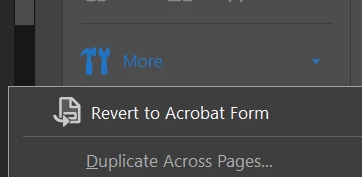
It seems that you have selected the Acrobat Sign form. As try67 suggested, you will need to convert it to Acrobat form.
Go to the More option on the right-hand pane in the Prepare Form tool. Then select Revert to Acrobat Form.
Please check the screenshot of the reference:
Thanks,
Meenakshi
Got your issue resolved? Please label the response as 'Correct Answer' to help your fellow community members find a solution to similar problems.
Already have an account? Login
Enter your E-mail address. We'll send you an e-mail with instructions to reset your password.
 AdChoices